simple
Visit the site and navigate to a product. At the bottom of the page, there is a "Check stock" button which initiates a query that returns the inventory of the product. Bring up the Developer Tools on the product page, then click the "Check stock" button. Examine the network request, its headers and its form submission body. Identify the URL for the POST and the names of the fields in the form submission.
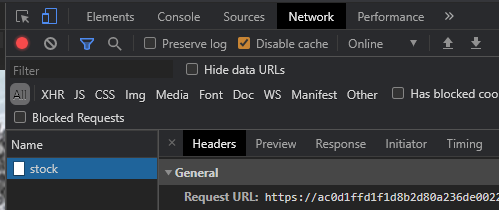
We can recreate this request using a Python script similar to the one below. Fill in the missing parameters and run the script. Ensure that you obtain the same result.
# <FMI> (Fill Me In) denotes a field you must modify
s = requests.Session()
stock_post_url = <FMI>
post_data = {
    '<FMI>' : '<FMI>',
    '<FMI>' : '<FMI>'
}
resp = s.post(stock_post_url, data=post_data)
print(resp.text)
The fields in this query are directly sent to an underlying operating system command, making the site vulnerable to an OS command injection attack. Using modifications to the script, attempt to use one of the command separators (e.g. a ';', '|', or other separators) to force the server to return the output of the date command back through the stock post.
- Take a screenshot for your lab notebook of the output
Due to the simplicity of the level, one can also exploit it directly within Developer Tools. We will now repeat the exploit in order to exfiltrate the vulnerable shell script that we are injecting into. To begin with, right click the "Check stock" button and "Inspect" it.
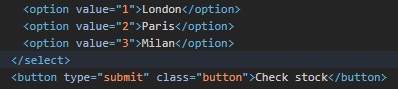
Then, in the form input fields, double-click the option value to append to the store identifier a semicolon that ends the command the value is used in followed by an ls command. Once modified, go back to the page and click the "Check stock" button to send the modified parameter. A directory listing should appear. Edit the option value again to instead run the cat command in order to return the contents of the shell script on the web page similar to that shown below

- Take a screenshot for your lab notebook of the output
Finally, finish the level by running the command that identifies the username of the account running the web site. For your reference, a list of common commands for Linux and Windows is given below:
Purpose of command | Linux | Windows |
Name of current user |
|
|
Operating system |
|
|
Network configuration |
|
|
Network connections |
|
|
Name lookups |
|
|
Running processes |
|
|
- Take a screenshot showing completion of the level that includes the level URL and your OdinId
blind-time-delays
Web applications may be written in a way that the results of a command are not directly returned. 'Blind' attacks allow an adversary to learn whether a web site contains a command injection vulnerability via other means. One way to do so is to inject a command that results in a delay in the processing of the request. For example, if one is able to successfully inject a 'sleep 5', the web application will pause for 5 seconds before returning a response, thus revealing that the application contains the vulnerability.
In this level, the feedback form has a command injection vulnerability. To begin with, visit the web site and then visit the "Submit feedback" page. Bring up Developer Tools, fill out the form, and then submit it. In Developer Tools, examine the network request URL along with the form submission data that is sent. Click on the "Response" to see the two characters that are returned from the server upon a successful submission.
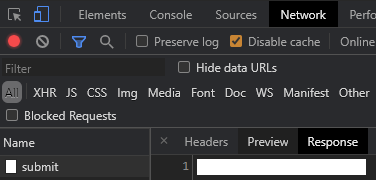
The Python script below can be adapted to submit this request as well. Modify the fields based on this request and run the script, ensuring you can properly post to the form with the same response.
s = requests.Session()
feedback_url = <FMI>
resp = s.get(feedback_url)
soup = BeautifulSoup(resp.text,'html.parser')
csrf = soup.find('input', {'name':'csrf'}).get('value')

feedback_submit_url = <FMI>
post_data = {
    'csrf' : csrf,
    'name' : '<FMI>',
    '<FMI>' : '<FMI>',
    '<FMI>' : '<FMI>',
    '<FMI>' : '<FMI>'
}
resp = s.post(feedback_submit_url, data=post_data)
print(resp.text)
The e-mail field in the form submission is vulnerable to blind command injection. To demonstrate this, inject a 10-second ping command with the -c flag into the e-mail parameter. For this particular injection, you will need to employ the boolean || operator around the command to inject it successfully (e.g. || ping -c 10 127.0.0.1 || ). Submit the feedback to cause a delay on the server in order to solve the level.
- Take a screenshot showing completion of the level that includes the level URL and your OdinId
blind-output-redirection
Another way to perform blind command injection is to use the injection to issue a command that writes to the file system. If an adversary can create a file within the web server that can then be subsequently downloaded or if the adversary can subsequently cause an error that results in sensitive data being sent to a log file that can be downloaded, data exfiltration can occur.
For example, in the previous level, we performed a ping command, but did not save its output. One can use file system redirection in the shell (e.g. >) to take the output of a command and put it in a web-accessible location. To solve the level, exfiltrate the username of the account running the web site by first executing the whoami command and redirecting it to a file in a directory from which images are served (e.g. || whoami > /var/www/images/output.txt || ). Then, access that file at ( /image?filename=output.txt )
- What is the username that runs the site?
- Take a screenshot showing completion of the level that includes the level URL and your OdinId
blind-out-of-band
Similar to redirection to a file, an adversary can also trigger a network request that can be seen by the adversary. For example, if the attacker controls the domain foo.com and wants to exfiltrate a password, a request to password.foo.com will reveal it. This technique belongs to a general class of "out-of-band" attacks.
Repeat the blind attack on the feedback submission form, but do so by injecting a command in the email parameter that triggers a name lookup on any subdomain of burpcollaborator.net. A successful lookup will automatically solve the level. In real life, an adversary would monitor the other end of the DNS request to pull the exfiltrated data out of the network.
- Take a screenshot showing completion of the level that includes the level URL and your OdinId