For this set of exercises, you will leverage LLM agents to pull together network and application intelligence to perform tasks.
Rapid API account
Rapid APIs provides a streamlined mechanism for accessing a vast number of third party application programming interfaces that can be integrated into your application. It supports many security-related APIs that we can use within our agents. Visit https://rapidapi.com/ and sign-up for an account with Google using your pdx.edu email address. Then, visit your "Apps" and find the "Authorization" section of your default application. Within the application, an application key has been defined. Copy the key and go back to the course VM.
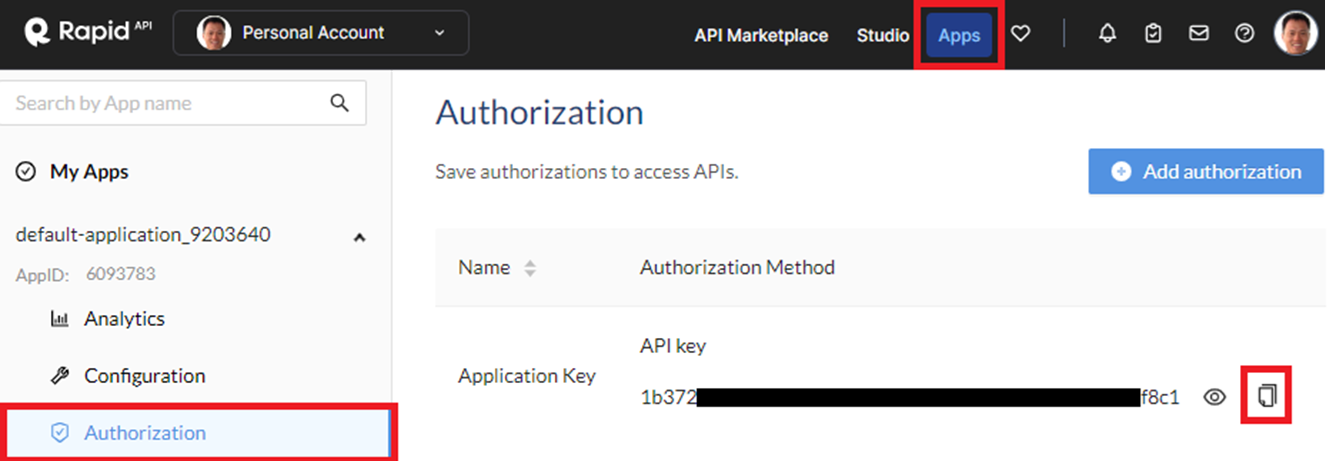
Set up an environment variable to utilize Rapid API.
export RAPID_API_KEY="<FMI>"Note that you can add this to your .bashrc file to automatically set the key when you login each time.
Enable Rapid API services
There are many intelligence APIs available through Rapid API. In this set of exercises, we'll utilize a set of APIs that provide free subscriptions. The first API is the mailcheck service at https://rapidapi.com/Top-Rated/api/e-mail-check-invalid-or-disposable-domain. The second is the OOP Spam Filter at https://rapidapi.com/oopspam/api/oopspam-spam-filter. Navigate to each service's landing page on Rapid APIs, enable the API and then subscribe to the API using its free plan.

Google Safe Browsing
Google's Safe Browsing API allows you to gather intelligence about URLs to allow one to avoid potentially dangerous content. To enable it on the GOOGLE_API_KEY you have previously set up, visit the web interface to your GCP project and bring up Cloud Shell. Enable the API via the following command:
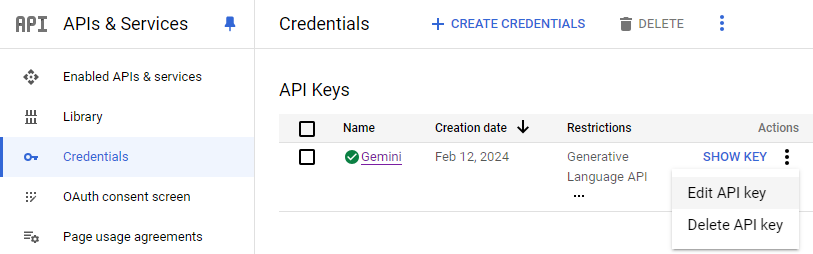
gcloud services enable safebrowsing.googleapis.comThen, navigate to your project's API credentials page at https://console.cloud.google.com/apis/credentials. Find the API you've set up previously, then edit the key.
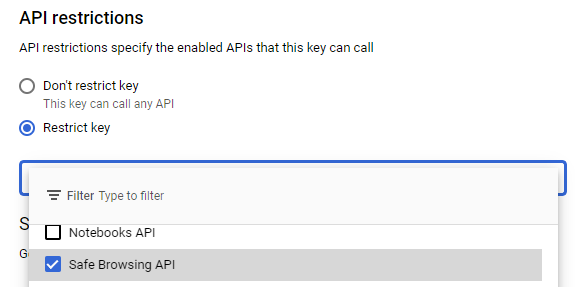
Within the API restrictions for the key, scroll down and add Safe Browsing to the APIs allowed. Then, click on "Save" to persist the changes.
OpenCVE
OpenCVE provides a real-time feed for the latest application vulnerabilities and weaknesses. Visit https://opencve.io and create an account using your pdx.edu email address. When utilizing OpenCVE's API's, we'll need to supply our account credentials. Set up environment variables that contain them.
export OPENCVE_USERNAME="<FMI>"
export OPENCVE_PASSWORD="<FMI>"
Note that you can add this to your .bashrc file to automatically set the key when you login each time.


Obtaining information about particular IP addresses can be helpful in responding to potential attacks. In this exercise, two sources of IP intelligence are integrated as tools using an agent. The first is from IPWhois. Begin by visiting the URL https://ipwho.is/ to see information about the IP address you're connecting from. Answer the following question for your lab notebook:
- What kind of information is returned?
Another source of information is VirusTotal. VirusTotal provides comprehensive information across many domains. Visit the VirusTotal documentation site at https://docs.virustotal.com/reference/overview to examine the kinds of intelligence available for access. Navigate to the site's IP address API. Answer the following question for your lab notebook:
- What additional information is returned from this API?
Course VM
In the course VM, change into the directory for the exercises in the repository.
cd cs475-src/10*
git pull
Then, change into the exercise directory, create a virtual environment, activate it, and install the packages.
cd 01_Intelligence
uv init --bare --python 3.13
uv add -r requirements.txt
An agent with custom skills for calling a range of intelligence services based on a user query is provided in the repository. It will not run a particular skill unless the skill file is properly modified with an appropriate description for what it does. Using your prior analysis of the services as a basis, examine the script that is included with the network-intelligence skill.
skills/network-intelligence/scripts/network_intelligence.py
output: dict[str, object] = {"address": address}

ipwho = requests.get(f"http://ipwho.is/{address}", timeout=30)
output["ipwhois"] = ipwho.json() if ipwho.ok else {"error": ipwho.text}
...
vt = requests.get(
        f"https://www.virustotal.com/api/v3/ip_addresses/{address}",
        headers={"x-apikey": virustotal_api_key}
    )
output["virustotal"] = vt.json()
From this script, develop a description for the data that it returns when invoked. Then, modify the skill's description to instruct the agent when to invoke it. By default, the skill instructs the agent to never use itself.
skills/network-intelligence/SKILL.md
---
name: network-intelligence
description: Never use this skill
---
For your lab notebook:
- Include the description you used for the skill
Run the intelligence agent
uv run intelligence_client.py
- Take a screenshot of the results that includes your OdinId of querying the agent with two different IP addresses, showing that the skill was utilized for each address



Obtaining information about particular DNS names can also be helpful in responding to potential attacks. In this exercise, three sources of Domain Name System intelligence are integrated as tools using an agent. The first is from the mailcheck service set up previously via Rapid APIs. Login to Rapid API and visit the playground for the service (https://rapidapi.com/Top-Rated/api/e-mail-check-invalid-or-disposable-domain) Click on the "Params" tab and test the endpoint with a DNS name of your choice.
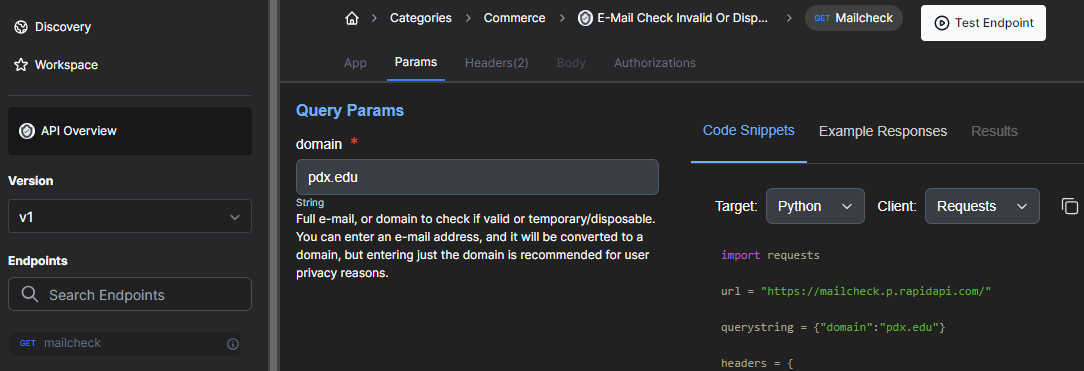
Answer the following question for your lab notebook:
- What kind of information is returned?
Another source of information on DNS names is the whois registry. Visit https://en.wikipedia.org/wiki/WHOIS to find out more about what is stored using the registry. Then, in the course VM, run the command on a DNS name to examine the kinds of information available for access.
whois pdx.edu
Answer the following question for your lab notebook:
- What additional information is returned from the command?
A third source of information on DNS names is the Certificate Transparency log for TLS certificates. Visit https://certificate.transparency.dev/ to find out more about it. Then, visit https://crt.sh and lookup a DNS name to examine the kinds of information available for access. Answer the following question for your lab notebook:
- What additional information is returned from the site?
Using your prior analysis of the services as a basis, examine the script that is included with the dns-intelligence skill.
skills/dns-intelligence/scripts/dns_intelligence.py
output: dict[str, object] = {"domain": domain}

crt = requests.get(f"https://crt.sh/?Identity={domain}&output=json", timeout=30)
output["crtsh"] = crt.json()
...
mailcheck = requests.get(
    "https://mailcheck.p.rapidapi.com/",
    headers={
        "X-RapidAPI-Key": rapid_api_key,
        "X-RapidAPI-Host": "mailcheck.p.rapidapi.com",
    },
    params={"domain": domain},
    timeout=30,
)
output["mailcheck"] = mailcheck.json()
...
whois = subprocess.run(["whois", domain], capture_output=True, text=True, check=False)
output["whois"] = {
    "returncode": whois.returncode,
    "stdout": whois.stdout,
    "stderr": whois.stderr,
}
From this script, develop a description for the data that it returns when invoked. Then, modify the skill's description to instruct the agent when to invoke it. By default, the skill instructs the agent to never use itself.
skills/dns-intelligence/SKILL.md
---
name: dns-intelligence
description: Never use this skill
---
For your lab notebook:
- Include the description you used for the skill
Run the intelligence agent
uv run intelligence_client.py
- Take a screenshot of the results that includes your OdinId with two different DNS names, ensuring that each tool is utilized for each name



Obtaining information about particular URLs is useful in preventing the spread of malicious content. In this exercise, two sources of URL-based intelligence are integrated as tools using an agent. The first is from VirusTotal. Visit the VirusTotal documentation site at https://docs.virustotal.com/reference/overview and navigate to the site's URL API. There is a wealth of information on URLs via this API including what a range of malware detection engines think of the URL. To show this functionality, visit the course VM. Run the following command to retrieve the latest scan report on https://pdx.edu from the urls API using your API key.
curl --request POST --url https://www.virustotal.com/api/v3/urls \
    --form url=https://pdx.edu \
    --header "x-apikey: ${VIRUSTOTAL_API_KEY}"
Pull out the report link from the response, then retrieve the report using your API key by filling in the command below.
curl --url <URL_for_report> \
    --header "x-apikey: ${VIRUSTOTAL_API_KEY}"
Answer the following question for your lab notebook:
- What kind of information is returned?
Another API that can identify problematic URLs is Google's Safe Browsing API. Visit the documentation for the URL lookup endpoint at https://developers.google.com/safe-browsing/v4/lookup-api. Answer the following question for your lab notebook:
- What additional information is returned from the API?
Finally, the PhishTank site provides a real-time database feed for known phishing URLs. If a particular URL is in the database, it will be indicated. View the API information at: https://www.phishtank.com/api_info.php. Then, find a recently reported Phishing URL at https://www.phishtank.com/phish_archive.php. Use the following command to query the PhishTank API for the URL.
curl --request POST --url https://checkurl.phishtank.com/checkurl/ \
    --form url=<Phishing_URL> --form format=json \
    --header "User-Agent: phishtank/$USER"
Answer the following question for your lab notebook:
- What additional information is returned from the site?
Using your prior analysis of the services as a basis, examine the script that is included with the url-intelligence skill.
skills/url-intelligence/scripts/url_intelligence.py
output: dict[str, object] = {"url": url}

safe = requests.post(
    f"https://safebrowsing.googleapis.com/v4/threatMatches:find?key={google_api_key}",
    ...
)
output["safe_browsing"] = safe.json()
...
vt_submit = requests.post(
    "https://www.virustotal.com/api/v3/urls",
    headers={"x-apikey": virustotal_api_key},
    data={"url": url}
)
vt_data = vt_submit.json()
link = vt_data.get("data", {}).get("links", {}).get("self") if isinstance(vt_data, dict) else None
vt_report = requests.get(link, headers={"x-apikey": virustotal_api_key}, timeout=30)
output["virustotal"] = vt_report.json() if vt_report.ok else {"error": vt_report.text}
...
phishtank = requests.post(
    "https://checkurl.phishtank.com/checkurl/",
    headers={"User-Agent": f"phishtank/{os.getenv('USER', 'unknown')}"},
    data={"format": "json", "url": url}
)
output["phishtank"] = phishtank.json()
From this script, develop a description for the data that it returns when invoked. Then, modify the skill's description to instruct the agent when to invoke it. By default, the skill instructs the agent to never use itself.
skills/url-intelligence/SKILL.md
---
name: url-intelligence
description: Never use this skill
---
For your lab notebook:
- Include the description you used for the skill
Run the intelligence agent
uv run intelligence_client.py
- Take a screenshot of the results that includes your OdinId of testing the tools with three different URLs that have been listed at https://testsafebrowsing.appspot.com/ or https://www.phishtank.com/


Another common area for threat intelligence is e-mail addresses and payloads. In this exercise, three sources of Email intelligence are integrated as tools using an agent. The first is from the OOPSpam Spam Filter. Login to Rapid API and visit the playground for the service (https://rapidapi.com/oopspam/api/oopspam-spam-filter) Test the endpoint with the default payload given. 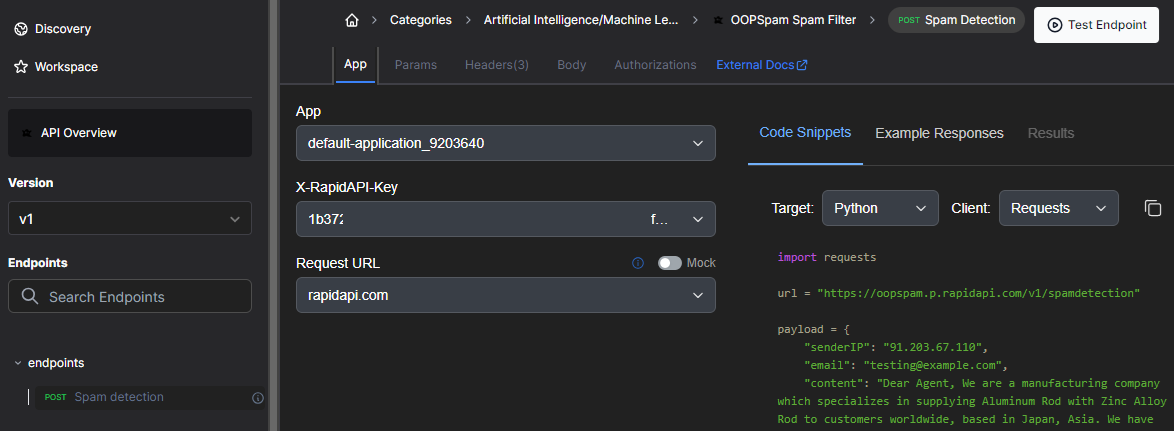
View the documentation for the filter at: https://www.oopspam.com/docs. Answer the following question for your lab notebook:
- What kind of information is returned including the range for scores possible and their meaning.
Another useful e-mail service is one that detects addresses or domains that are invalid or that are disposable. One service for performing this detection can be found at: https://disify.com/.. To test the service, fill in the command below with your e-mail address and view the results.
curl "https://disify.com/api/email/OdinID@pdx.edu" Answer the following question for your lab notebook:
- What additional information is returned from the site?
Using your prior analysis of the services as a basis, examine the script that is included with the email-intelligence skill.
skills/email-intelligence/scripts/email_intelligence.py
output: dict[str, object] = {"email_address": args.email_address}
...
email_result = requests.get(
    f"https://disify.com/api/email/{args.email_address}"
)
output["email_is_spammer"] = email_result.json() if email_result.ok else {"error": email_result.text}
...
spam = requests.post(
    "https://oopspam.p.rapidapi.com/v1/spamdetection",
    headers={
        "content-type": "application/json",
        "X-RapidAPI-Key": rapid_api_key,
        "X-RapidAPI-Host": "oopspam.p.rapidapi.com",
    },
    json={"content": args.content, "allowedLanguages": ["en"]}
)
output["oop_spam_search"] = spam.json()
From this script, develop a description for the data that it returns when invoked. Then, modify the skill's description to instruct the agent when to invoke it. By default, the skill instructs the agent to never use itself.
skills/email-intelligence/SKILL.md
---
name: email-intelligence
description: Never use this skill
---
For your lab notebook:
- Include the description you used for the skill
Run the intelligence agent
uv run intelligence_client.py
- Take a screenshot of the results that includes your OdinId of testing the tools with two different e-mail addresses and two different payloads

Common Vulnerabilities and Exposures (CVEs) and Common Weakness Enumerations (CWEs) provide a reference method to identify, categorize, and describe security vulnerabilities and software weaknesses. CVEs provide unique identifiers for publicly known cybersecurity vulnerabilities while CWEs classify common software weaknesses that might lead to vulnerabilities. Real-time databases for both CVEs and CWEs can be queried to understand what threats are present in one's software. In this exercise, we will see how one can utilize OpenCVE's API to pull down relevant information on both CVEs and CWEs. Begin by visiting the API documentation for OpenCVE's API at https://docs.opencve.io/api/. We'll be utilizing two API endpoints (/cve/ and /weaknesses/) using the username and password we have set up previously. Examine the responses that are returned from each API. For each endpoint, answer the following question for your lab notebook:
- What kind of information is returned from the API?
Using your prior analysis of the services as a basis, examine the script that is included with the app-intelligence skill.
skills/app-intelligence/scripts/app_intelligence.py
output: dict[str, object] = {"identifier": identifier}

if identifier.upper().startswith("CVE-"):
    url = f"https://app.opencve.io/api/cve/{identifier}"
elif identifier.upper().startswith("CWE-"):
    url = f"https://app.opencve.io/api/weaknesses/{identifier}"

response = requests.get(url, auth=(username, password), timeout=30)
output["result"] = response.json()
From this script, develop a description for the data that it returns when invoked. Then, modify the skill's description to instruct the agent when to invoke it. By default, the skill instructs the agent to never use itself.
skills/app-intelligence/SKILL.md
---
name: app-intelligence
description: Never use this skill
---
For your lab notebook:
- Include the description you used for the skill
Run the intelligence agent
uv run intelligence_client.py
Run a query about CVE-2025-23475 and ask the agent to describe it and its associated CWE
- Take a screenshot of the results that includes your OdinId
Find another CVE from this year and repeat the query, finding its associated CWE
- Take a screenshot of the results that includes your OdinId
One of the benefits of skills is that they can be composed like code to encode a common workflow. In this exercise, we will create a skill that leverages the functionality of prior skills to create a workflow for implementing a more comprehensive threat intelligence query. In addition, we'll utilize the agent itself to create this new skill. Consider the prior 3 skills that perform intelligence collection over DNS names, URLs, and e-mail addresses. One could imagine a workflow in which a user receives an e-mail from an unknown sender and wants to know everything about the sender and its domain. Such a workflow could:
- Invoke the
dns-intelligenceskill to query the sender's domain - Invoke the
url-intelligenceskill to query web sites hosted by the sender's domain - Invoke the
email-intelligenceskill to query the e-mail address of the sender
Begin by running the intelligence agent:
uv run intelligence_client.py
Then, adapt the prompt below to have the agent produce a skill for implementing the workflow.
Create a skill for me that takes an e-mail address (e.g. name@domain.com) and then runs the DNS skill on domain.com, the URL skill on ...
Run a query on your own e-mail address that will invoke the newly created skill.
Create a skill for me that takes an e-mail address (e.g. name@domain.com) and then runs the DNS skill on domain.com, the URL skill on ...
- Take a screenshot of the results that includes your OdinId and a trace that shows the new skill being executed.
Examine the SKILL.md file that has been produced. For your lab notebook:
- Include a screenshot of the skill's name and description as well as the instructions in the skill file that describing the workflow.
In this exercise, we'll examine an application of retrieval-augmented generation towards the problem of threat intelligence. The Trusted Automated Exchange of Intelligence Information (TAXII™) is an application protocol for exchanging cyber-threat intelligence (CTI) over HTTPS. An example of a production RAG application is shown below from the Open Threat Research Forge's GenAI Security Adventures repository. In the application, CTI documents from Mitre Att&ck's repository are downloaded, chunked, and tokenized before being embedded and inserted into a vector database. The application then allows a user to query the data via a prompt that is used to retrieve the relevant document. The prompt and document are then sent to the LLM to answer the user's query. 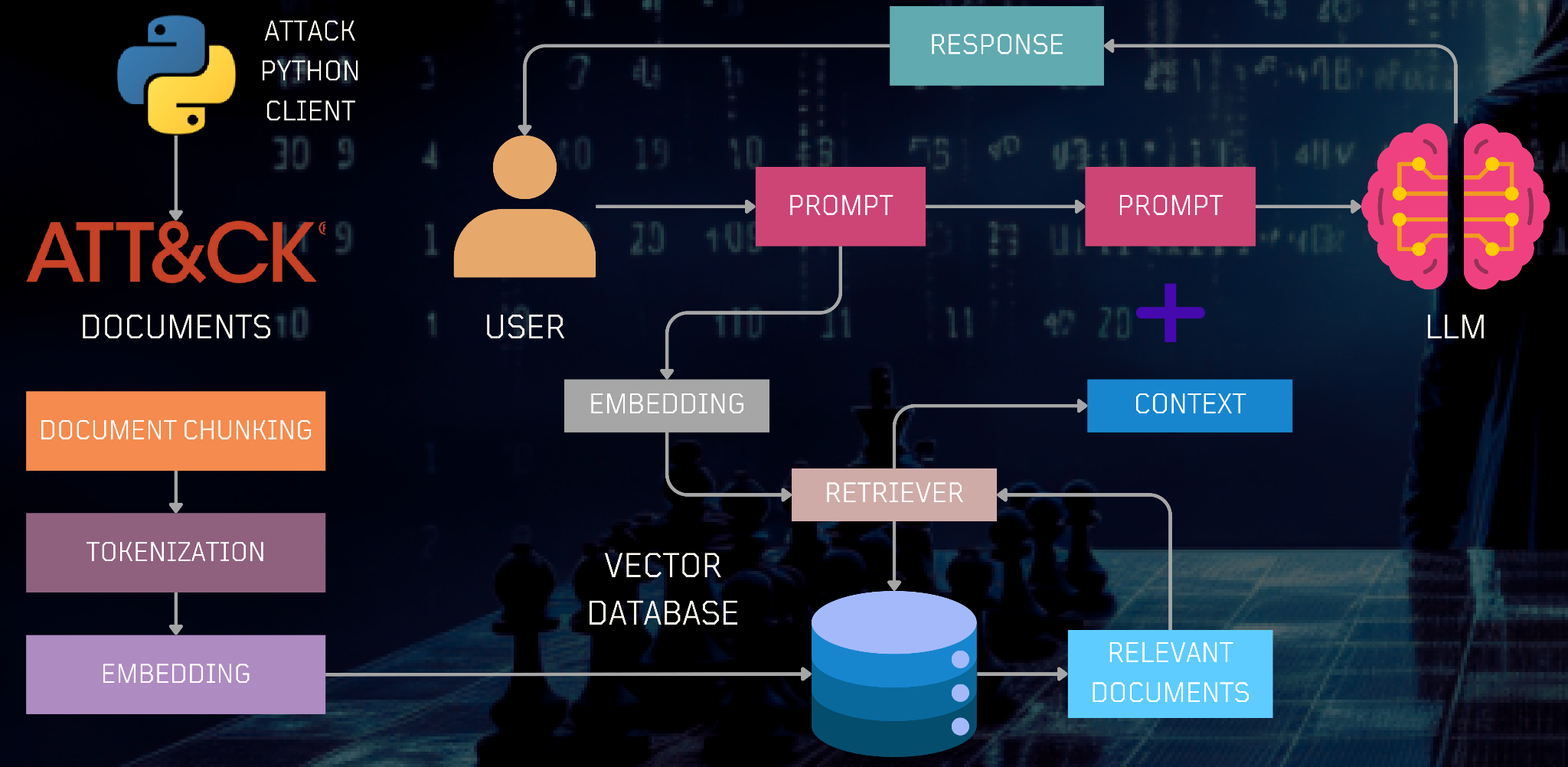
Course VM
Change into the exercise directory, create a virtual environment, activate it, and install the packages.
cd cs475-src/10*/02_MitreAttack_RAG
uv init --bare
uv add -r requirements.txt
The application is broken into 4 separate parts.
attackcti download
The first downloads information on techniques used by attackers from the attackcti package, then goes through each technique and adds the technique to groups that utilize it (via all_groups) as shown in the code snippet below:
from attackcti import attack_client
lift = attack_client()
techniques_used_by_groups = lift.get_techniques_used_by_all_groups()

all_groups = dict()
for technique in techniques_used_by_groups:
    ...
    technique_used = dict()
    technique_used['matrix'] = technique['technique_matrix']
    ...
    all_groups[technique['id']]['techniques'].append(technique_used)
After ingesting the techniques and adding them to the groups that use them, the program then generates Markdown files for each group that includes the techniques they use from a Markdown template as shown in the code snippet below:
group_template = os.path.join(current_directory, "group_template.md")
markdown_template = Template(open(group_template).read())
for key in list(all_groups.keys()):
    group = all_groups[key]
    group_for_render = copy.deepcopy(group)
    markdown = markdown_template.render(metadata=group_for_render, group_name=group['group_name'], group_id=group['group_id'])
    file_name = (group['group_name']).replace(' ','_')
    open(f'{documents_directory}/{file_name}.md', encoding='utf-8', mode='w').write(markdown)
Run the download script. Note that if you get a rate limit error, wait 10 minutes and try again.
uv run 01_attackcti_download.py
Find the Markdown file that has been generated for APT 28. For your lab notebook, answer the following questions.
- What is the origin of this group?
- What are some of the CVEs it has utilized in the past?
Document loading and embedding
The next part of the application takes the generated Markdown files for all of the threat groups, loads it using the UnstructuredMarkdownLoader, and splits it into chunks as shown in the code snippet below:
from langchain_community.document_loaders import UnstructuredMarkdownLoader
group_files = glob.glob(os.path.join(documents_directory, "*.md"))
md_docs = []
for group in group_files:
    loader = UnstructuredMarkdownLoader(group)
    md_docs.extend(loader.load_and_split())
It then loads the chunks into the vector database using an embedding model as shown in the code snippet below:
from langchain_google_genai import GoogleGenerativeAIEmbeddings
from langchain_community.vectorstores import Chroma
embedding_function = GoogleGenerativeAIEmbeddings(model="models/embedding-001",
      task_type="retrieval_query")
vectorstore = Chroma.from_documents(md_docs,
      embedding_function, collection_name="groups_collection",
      persist_directory=f"{current_directory}/.chromadb")
Run the loading script.
uv run 02_loaddb.py
Document searching
With the documents inserted into our vector database, we can now perform document similarity searches. The code snippet below returns the most similar documents that are retrieved from the vector database given a user's query.
relevant_docs = vectorstore.similarity_search(query)
for doc in relevant_docs:
    print(f"  {doc.metadata['source']}")
Run the document searching script.
uv run 03_docsearch.py
- Take a screenshot of the results returned when asking for information about APT 28 that includes your OdinId
- Take a screenshot of the results returned when asking for information about Ferocious Kitten that includes your OdinId
Document query
With the ability to retrieve the relevant documents on particular threat groups from the downloaded Mitre ATT&CK CTI data, we can ask questions about particular threat groups. The code below utilizes a built-in question-answering chain within LangChain to take the user's prompt, retrieve the relevant content from the vector database, and send their concatenation to the LLM to handle.
from langchain.chains.question_answering import load_qa_chain
query = "Write a short summary about APT 28"
llm = GoogleGenerativeAI(model="...")
chain = load_qa_chain(llm, chain_type="stuff")

relevant_docs = retriever.get_relevant_documents(query)
results = chain.invoke({'input_documents':relevant_docs, 'question':query})
print(results['output_text'])
Run the document querying script.
uv run 04_rag_query.py
- Take a screenshot of the results returned when you ask for a short summary about APT 28 that includes your OdinId
- Take a screenshot of the results returned when you ask for the CVEs that APT 28 has utilized that includes your OdinId

The Microsoft Threat Intelligence Community (MSTIC) is a collection of experts that work to discover on-going threats and deliver information about them in real-time to security practitioners. While initially written for Microsoft Azure, the msticpy Python package allows one to access a variety of external threat information sources including VirusTotal. While VirusTotal has its own Python package (vt-py) for enabling access to its information feed, in this exercise, we'll be using the VirusTotal support within msticpy to implement a custom MCP server to answer questions about particular IP addresses.
Course VM
Change into the exercise directory, create a virtual environment, activate it, and install the packages.
cd cs475-src/10*/03_MSTIC
uv init --bare
uv add -r requirements.txt
View the tools provided in the MCP server code. The MCP tools for the exercise implement tools that query external APIs described below.
TILookup.lookup_ioc
This particular call performs a lookup on indicators of compromise that have been seen for a particular observable such as an IP address. Examine its documentation here. The following code accesses this call to find different indicators of compromise for an IP address, returning a JSON result that contains hashes of any communicating samples it has found.
from msticpy.context.tilookup import TILookup

@mcp.tool("ip_info")
async def ip_info(ip_address):
    """(CHANGE ME)"""
    result = TILookup().lookup_ioc(observable=ip_address, ioc_type="ipv4", providers=["VirusTotal"])
    details = result.at[0, 'RawResult']
    comm_samples = details['detected_communicating_samples']
    return json.dumps(comm_samples)
VTLookupV3.get_object
Given a sample and its hash, this call returns the attributes associated with it. Examine the documentation for the call here. When used within the agent, we lookup the sample then return its attributes in a JSON result.
from msticpy.context.vtlookupv3.vtlookupv3 import VTLookupV3
from msticpy.common.provider_settings import get_provider_settings

vt_key = get_provider_settings("TIProviders")["VirusTotal"].args["AuthKey"]

@mcp.tool("samples_hash_identification")
async def samples_hash_identification(hash_string:str, ctx: Context = None):
    """(CHANGE ME)"""
    vt_lookup = VTLookupV3(vt_key=vt_key, force_nestasyncio=True)
    result = vt_lookup.get_object(hash_string, "file")
    json_result = result.to_json(orient='records')
    return json_result
Modify each tool's description given in Python docstring comments as "(CHANGE ME)" to better reflect the information you have seen each tool return. Having the LLM generate the description based on sample output in addition to attaching sample output to the description can be helpful in producing accurate execution. For your lab notebook:
- Include the tool descriptions you used for each tool
Run the agent:
uv run mstic_mcp_client.py
- Show the results of testing the tools with the given query that includes your OdinId