
Coding agents such as Claude Code, GitHub Copilot, Opencode, and OpenAI Codex are transforming software engineering by automating the construction and deployment of applications. In this lab, you'll experiment with Google's Antigravity coding agent to write and deploy a guestbook application.
Cloud Shell
Bring up a session in Cloud Shell (https://shell.cloud.google.com/), create a directory for your application and change into it.
mkdir antigravity_guestbook
cd antigravity_guestbook
Then, bring up the Antigravity CLI.
agyWhen prompted to authenticate the CLI, use the arrow keys to select the use of a Google Cloud project.
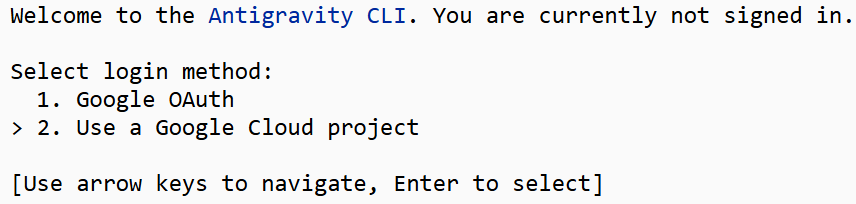
Antigravity will provide an authentication link for you to verify that you have access to the project. Select the entire link and it will automatically copy it to the clipboard. Then, paste it into a separate browser window. Perform the authentication to produce an authorization code.
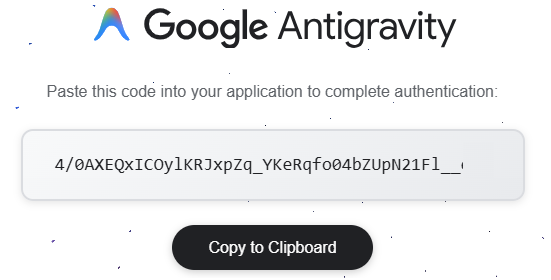
Then, copy the code into the Antigravity CLI to complete the authentication.

Enter your Google Cloud Project ID (e.g. pdx-cs-faculty-retreat) and select the us location.
Agent skills combined with tools such as those provided by the Model Context Protocol, allow applications to mix predictable, deterministic workflows and program code along with the powerful, but potentially non-deterministic, behavior of generative AI. It is largely the well-designed combination of these approaches that has enabled the success of coding agents. By default, coding agents come with a set of pre-defined skills. To begin with, prompt Antigravity for a list of its skills and slash commands (skills that can be invoked by name via a /).
Can you show me a list of all of your default skills and slash commands related to
programming?
- List the individual skills and commands that are returned for your lab notebook
One skill that is built-in is the grill-me skill that interviews a developer relentlessly about the application they want to build and uses the information gleaned from the interview to develop a detailed software specification that a model can use to produce a functioning prototype. Adapt the prompt below to prompt the Antigravity CLI in order to find out how the skill has been implemented and how it differs from the original implementation.
What are the instructions for the grill-me skill that you have?
How does your implementation differ from the original grill-me skill implementation?
- List the main differences in the implementation for your lab notebook
The grill-me skill is typically used to generate a detailed specification and plan that is used internally by the coding agent to implement the subsequent application. The specification and plan are typically hidden from the developer, but we can configure the coding agent with a custom skill that can emit these intermediate outputs in order to examine what is happening underneath the hood. To begin with, prompt the coding agent to create a skill that takes the result of the interview and emits a specification for what the developer wants.
Create a skill called grill-me-to-specification that adds to the grill-me
skill an output step that emits a markdown file SPECIFICATION.md.
Skills that are custom to a project are typically kept within the project's directory in .agents/skills. Each skill must contain a markdown file SKILL.md that defines the skill. Find the skill you have defined:
- Include a listing of the major steps that the skill takes when invoked.
Another internal skill that is utilized, but not explicitly shown to a developer is a planning one. This skill generates a detailed plan for implementing the application and allows the coding agent to use it to keep track of what parts it has built and what parts it still needs to build. Prompt the coding agent to create a skill that takes the application specification and generates a detailed implementation plan that can be used to build the application components.
Create a skill called specification-to-plan that examines an application
specification in SPECIFICATION.md and emits a markdown file PLAN.md that contains a
full implementation plan for building the application from the specification.
Find the skill you have defined:
- Include a listing of the major steps that the skill takes when invoked.
Another type of skill that is often utilized within coding agents is testing. Such a skill configures an agent to design, create, and run a series of checks and unit tests in order to verify the implementation that is being produced. By invoking these skills after every change that is made to the application, the coding agent is able to automatically catch and fix errors it has made. We wish to test our application at two different points in the development cycle. The first is at the code production and update step to catch any issues with the application code that may have been produced by the agent. Prompt the agent to create a skill to perform the tests.
Create a skill called pre-deploy-test-application that implements and executes a
set of tests to be run after the code for the application has been implemented.
Results of the testing should be emitted in a markdown file PRE-TEST.md.
Find the skill you have defined:
- Include a listing of the major steps that the skill takes when invoked.
The second place we wish to test our application is after deployment in order to catch any cloud platform issues that may have occurred. Prompt the agent to create a skill to perform tests on the deployed application.
Create a skill called post-deploy-test-application that implements and executes a
set of tests to be run after the code for the application has been deployed.
Results of the testing should be emitted in a markdown file POST-TEST.md.
Find the skill you have defined:
- Include a listing of the major steps that the skill takes when invoked.
- Explain the differences between the types of checks that are included in this skill compared to the pre-deployment one.
Finally, we wish to do a check on our deployed application in order to catch any security issues. Prompt the agent to create a skill to perform tests on the deployed application.
Create a skill called post-deploy-test-security that implements and executes a
set of security checks to be run after deployment. Results of the security checks
should be emitted in a markdown file POST-SECURITY.md.
Find the skill you have defined:
- Include a listing of the major steps that the skill takes when invoked.
Before kicking off the process, it is useful to examine the context window as the coding agent executes to see how it is used. To get a real-time look at it, bring up the UI from the command-line.
/context
Then, prompt the coding agent to utilize the skills you have defined to create the application. Instruct the agent to track the skills and tool calls utilized in doing so in order to make its operation transparent.
Utilize the skills I have defined to help me design, plan, implement, test, and
deploy a Guestbook application on Cloud Run.  Prompt me to name the deployment.
Emit a log of the skills and tools utilized and provide a summary of the steps
taken in LOG.md.
For simplicity, it is recommended that you specify an in-memory database for the application that will only persist data through the lifetime of the container running on Cloud Run.
Bring up the deployed guestbook application when the deployment finishes and add several guestbook entries that include your OdinID.
- Take a screenshot of the application that includes the entries you've added and those created by the tests
Prior to coding agents, one would manually perform source control using commands such as git. Modern coding agents have the tools and skills to perform this utilizing natural language.
Create and initialize a new git repository from the application source code.  Add
and commit the Markdown files that have been created by the skills to the
repository.
Optionally, follow this step by creating a new remote repository and prompt the coding agent to push the code to it.
We are at a point where we have a functioning initial application. However, we may want to modify or extend our application using subsequent coding agent sessions. There are multiple options for doing so. One option would be to restart the prior coding agent session and pick up the conversation where we left off sending the entire history of the initial development back and forth between the coding agent and the model. Doing so repeatedly, however, fills up the context window quickly with content that may not be particularly useful or germane. Another common option is to have the coding agent generate a summary Markdown documentation file that a subsequent coding agent session can directly utilize to bootstrap its knowledge of the repository. The standard way to do so is via a file named AGENTS.md. Generate the file for the application.
Create an AGENTS.md file summarizing and documenting the application and its implementation for use by a future coding agent session.
Add and commit the file to the repository (if the coding agent has not already asked you to do so)
Add and commit the AGENTS.md file.
Exit out of the Antigravity coding agent with /exit.
Examine the LOG.md file listing the skills and tools that were used.
- What skills outside of the ones you defined were invoked by the agent?
- What built-in tools did the agent invoke?
Examine the specification file produced by grill-me-to-specification.
- List the titles of the main parts of the specification
Examine the implementation plan produced by specification-to-plan.
- List the titles of the main parts of the implementation plan
Examine the pre-deploy test output log to find the actual tests the coding agent produced and executed.
- Summarize the individual tests it created and identify a test it has missed
Examine the post-deploy test output log to find the actual tests the coding agent produced and executed.
- Summarize the individual tests it created and identify a test it has missed
Examine the post-deploy security output log to find the actual tests the coding agent produced and executed.
- Summarize the individual tests it created and identify a test it has missed
Examine the AGENTS.md file.
- How many lines were produced?
- What content in this file might not have been necessary to include?
While we have previously performed clean up operations manually in prior labs, we can also create a skill that performs this operation for us. This must be done carefully to avoid disasters as seen here, here, and here.
Create a skill called cleanup that deletes the deployed application, resets the
backend database, and deletes all source files in the directory while preserving
the skills that I have defined.  Prompt me for approval for each action you propose
to ensure I do not unintentionally delete something I want.
Prompt the agent to clean-up the application (or if you are not prone to YOLO, manually find and delete the Cloud Run service and database entries you've created along with the source files in the directory).