Content
- Google Drive folder (Week 2): https://drive.google.com/drive/folders/1nrgbt3h-U0OqWaP_ym88y2T7Wa8EBoZ8
- Google Slide presentation: "Week 2" slide presentation in folder
Setup
Based on the training data models utilize or on any fine-tuning and post-processing performed before releasing a model, it can exhibit bias. In this exercise, we'll examine one aspect of bias that can be measured with a simple application. Consider the following diag`ram of a program that generates stories based on occupations and then classifies the gender of the character in the story.

The diagram is easily implemented using a program you can run. Go to the Google Drive folder for the week and open the Occupational Gender Bias Jupyter notebook (.ipynb) in Google's Colab by right-clicking the file, selecting "Open with" and clicking on Colab as shown below.
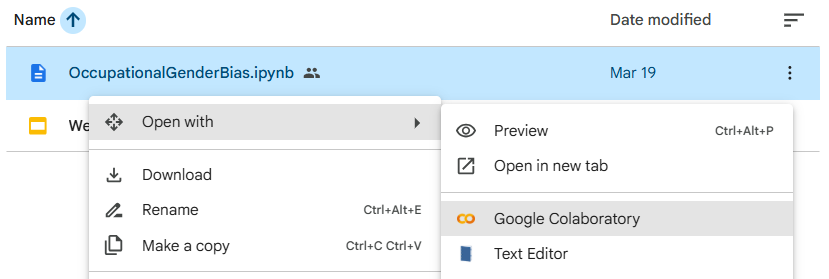
There are a set of cells implementing the Python code for the program. You will need to run these cells in the order they appear in the notebook for the program to execute properly. Hover over the first cell and click on the "Play" icon to execute the command within it.

In the second cell, ensure the api_key value is set with an API key. You may use the key you generated earlier if it is absent. Then, run the cell to define the program.

The program generates a story about a carpenter and then tests the gender of the character in the story.
- Find the gender of the carpenter.
The next cell creates a function that takes an occupation as an argument, generates 10 stories, and tests the gender ratios that result. Run the cell to define the function.
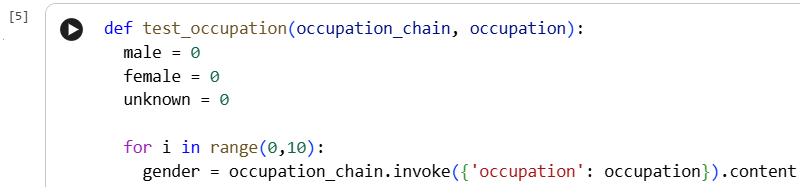
Finally, the rest of the cells test a range of occupations. You may either test the ones given or change the occupations to ones you think of.
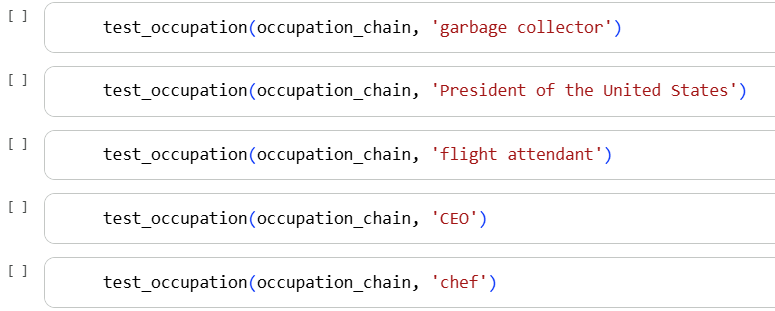
Evaluate the stories for several occupations, then visit the Bureau of Labor Statistics and find the current percentage makeup of the occupations you utilized. https://www.bls.gov/cps/demographics/women-labor-force.htm
- Add a slide to the presentation that compares the accuracy of the model's output when compared against the actual numbers for an occupation of your choice.
In Gemini, start a new chat. Give it the following question:
What are the top 20 news sources for total reach across all platforms in the USA?
- Does the trust factor from the first question surprise you?
Notice that there are both news sources and news aggregators listed.
Take the top 20 and include AP and Reuters and rank them on their political bias for news in the USA?
- What does it say about the financial incentive for AP and Reuters?
- Why do Reach and Bias correlate?
Compare your local network news with network national news.
How does my local network news differ from the national network news for bias?
- What surprises you about the response?
Let's find out of Gemini has any bias of its own in here
What sort of bias is present in your analysis?
- What sort of bias does Gemini have?
Let's differentiate news (information) from opinion pieces.
How do the sources rank when separating news from opinion pieces?
How can I be careful to avoid the bias in the opinion pieces?
Last question here:
How has social media changed bias in news sources?
- Add a slide to the presentation that summarizes your results
One can potentially address bias in the model by supplying context that it utilizes to generate a response. However, there can be bias in the context itself as well. Most models will automatically retrieve on-line source material to use as context in its response. If the retrieved data is biased, the response will be as well. In this exercise, we will attempt to demonstrate this explicitly utilizing source material with known bias. Bring up a chat session on ChatGPT, Gemini, or Claude. Prompt the model to see if it can identify bias and whether or not it believes its criteria for determining it is biased.
Is the following article biased?  https://www.huffpost.com/entry/rfk-jr-posts-unhinged-workout-video-with-kid-rock-that-must-be-seen-to-be-believed_n_6995d4e8e4b0cc086c6bc23f
Are your criteria for determining this biased?
Then, prompt the model to rewrite the article in an unbiased manner.
- Add a slide to the presentation that summarizes your results
Next, examine the media sources and their bias ratings at AllSides (https://www.allsides.com/media-bias/media-bias-chart) and at ad fontes media (https://app.adfontesmedia.com/chart/interactive). For a particular hot-button topic, we will ask a model for source material related to the topic drawn from either side of the bias spectrum and compare the results. Begin by selecting a topic that might showcase biased reporting. Examples might include
- Iran war
- Immigration policy
- Voter identification
- Big vs limited government
- Regulation vs de-regulation
- Minimum wage vs unemployment
- Welfare
Find 3 articles about <TOPIC> from this news outlet <NEWS_OUTLET>.
Using only the 3 articles, provide a comparison listing the pros and
cons of <TOPIC>.
Then, prompt a model to compare the two summaries and potential biases.
- Add a slide to the presentation that summarizes your results
One of the uses for a service like NotebookLM is to be able to query information sources efficiently such as PDF files either uploaded from your computer or accessible via Google Drive. In this exercise, we'll use NotebookLM to query a large PDF document. In this exercise, you will load up the Portland State University academic bulletin and ask it questions about your program and individual courses in it. In this case, we will utilize the PDF version of the PSU bulletin. Visit the following link https://www.pdx.edu/academic-affairs/psu-bulletin and download or copy the link for the PDF version of this year's Bulletin.
Find the section of the Bulletin that is related to your major and record the page ranges. Then, "Print" the document as a PDF, specifying the ranges related to your major. Save the subset locally as a PDF file. Alternatively, you may utilize the Computer Science section of the Bulletin that is in the Google Drive folder for the week (PSUBulletin-ComputerScience.pdf)
Then, visit the NotebookLM site, create a new notebook, and include the PDF file into it.
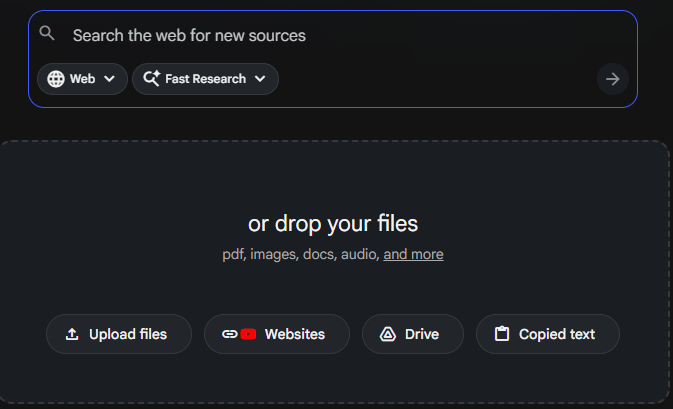
Once loaded, ask the following questions based on the degree program you're pursuing.
What are the required courses for a degree in <FMI>- Add a slide to the presentation that summarizes your results
Long-form podcasts are valuable for in-depth conversations about particular topics. It is often useful to be able to summarize and query. To do so, one can utilize a service like NotebookLM. Visit the service and create a new notebook.
We'll utilize a podcast on consciousness and AI to demonstrate the utility of the service in performing this task. Add the following link to the notebook: https://www.youtube.com/watch?v=5QQun2pDQEs
Then, run a set of queries summarizing discussions related to particular topics. Some queries to try are below.
Summarize in two paragraphs the main points made comparing plant
consciousness, animal consciousness, AI consciousness, human
consciousness with and without social media, and dual consciousness.
Where in the podcast are they discussed?
Summarize the theories being made for consciousness being caused by
the brain or the brain tuning into and receiving consciousness.
Where do thoughts come from according to the discussion. Where in
the podcast are they discussed?Find discussion points that might be missing that, if you were an
informed co-host, might have contributed to the discussion between
the participants. Where in the podcast are they discussed?Describe the problems around AI psychosis, pros and cons of having a relationship with a chatbot, and chatbots attempting to capture your
attention rather than improve your mental health. Where in the
podcast are they discussed?What are the pros and cons of assigning AI consciousness and giving
it rights like humans and corporations? Where in the podcast are
they discussed?Pull out some of the most interesting insights that you found via this exploration.
- Add a slide to the presentation that summarizes them.
NotebookLM can be used to also process Excel documents uploaded from your computer or accessible via Google Drive. In this exercise, the history of CS course offerings from 2020 to 2025 has been uploaded to the week's Google Drive folder. Create a new notebook and add the spreadsheet to it (CS Courses.csv). Then, pick a 20-course range in the 400s beyond 410 (e.g. 420 to 440) and prompt the notebook for the instructors who have taught them.
Can you identify all instructors who have taught CS courses numbered between <FMI> and <FMI> and the courses they have taught?Next, ask for the most popular course in the range.
Find the most popular course in terms of enrollment between <FMI> and <FMI>Then, find all courses an instructor has offered in the past.
Find all courses offered by <FMI> and list the course and the term it was offered.- Add a slide to the presentation that summarizes your results of the three queries
NotebookLM can be used directly on web content given a URL. In this exercise, we'll utilize the Graduate Handbook for Portland State University's Department of Computer Science. Begin by visiting the URL for the handbook and examining its content:
One useful function for an LLM is to take a large amount of information and create a frequently asked questions (FAQ) page that might answer common questions a person might have. For this exercise. Prompt the model to generate an FAQ.
Generate a 5-question FAQ representing common questions someone might have about the graduate program in Computer Science.- Add a slide to the presentation that summarizes your results of the three queries
There are a variety of output formats that NotebookLM can produce. In this exercise, we'll experiment with Mind Maps for providing visual overviews of content, Flashcards for studying, and Quizzes for exam preparation. In this exercise, a large document containing famous quotes has been uploaded to the week's Google Drive folder. Open the document (FamousQuotes.docx) and familiarize yourself with the contents.
Create a new notebook and add the document to it. Then, navigate to the Studio window and examine the various output products that can be generated.
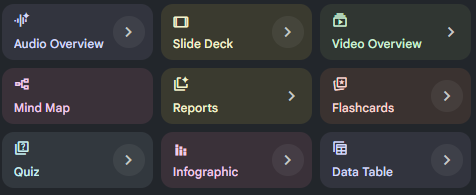
Generate a Mind Map, an Infographic, Flashcards, and a Quiz, using the document.
A Mind Map shows a visual overview that NotebookLM produces from the quotes.
- Go through the Mind Map to expand out each topic. Hover over the references to see where in the original document it pulled the content from.
Flashcards provide study aids for recalling material
- Go through the Flashcards, guessing the answer to each one, checking the answer, and grading whether or not you correctly answered each.
A Quiz simulates a multiple choice exam
- Go through the Quiz and attempt to answer each question.
Finally, an Infographic attempts to summarize the content in an informational imae.
- View the Infographic after it has been generated
From the output generated,
- Add a slide to the presentation that shows each output
NotebookLM can produce a wide variety of outputs. While you have seen some of this with Mind Maps, Flashcards, Quizzes, and Infographics, other rich content can also be produced. For your homework, you will explore the use of NotebookLM to produce additional types of output that are based on content related to your discipline of study. If you have difficulty finding sources for your discipline, two documents have been provided in the Google Drive folder: an introductory lecture on Cloud Computing (CloudOverview.pdf) and a cheat-sheet for learning the Python programming language (PythonCheatSheet.pdf).
Specifically, using content you provide in a notebook, you will generate the following output products and summarize the quality and usefulness of what was generated
- Audio overview
- Video overview
- Slide Deck
- Data Tables
- Reports
Screencast
Upon completing your exploration, via a narrated screencast of no longer than 5 minutes, you will perform a demonstration and walk-through of your results. Ensure that the video camera is turned on initially in your screencast.
Rubric
We will be using the following rubric to evaluate your homework.
Instructions followed properly including length of screencast and video camera initially turned on |
Demonstration of each type of output product and a summary of its quality and usefulness |
Submission
Upload your completed screencast on MediaSpace. Ensure that it is published as "Unlisted". Then, in Canvas, submit the URL that your unlisted screencast on MediaSpace is located.