Content
Each week, resources for the in-class exercises will be provided via a Google Drive folder.
- Google Drive folder (Week 1): https://drive.google.com/drive/folders/1nrgbt3h-U0OqWaP_ym88y2T7Wa8EBoZ8
Each week, you will also be asked to experiment with Generative AI and report your findings in a Google Slide presentation to the rest of the class.
- Google Slide presentation: https://docs.google.com/presentation/d/1h5iNsUNNeAbXteakcI_wOXjAS4anjBVSMZH8UcC3fXU
Slack Account
There is a Slack workspace for Computer Science students here at PSU. If you haven't already, create a Slack account, join the workspace at https://pdx-cs.slack.com and add the course channel linked on the course web page. Course communication will be done through this platform; check the pinned section for important updates.
Google Cloud account
Incognito mode
To avoid applying the coupon you receive to the incorrect account, ensure that these steps are done in an "Incognito" or "Private Browsing" browser window to set up your account.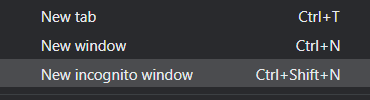
Then, visit https://console.cloud.google.com and login using your pdx.edu account to enable GCP. If you haven't used GCP yet and do not mind temporarily putting your credit card on the account, apply for the $300 coupon and use it to create a new billing account. Otherwise, visit the coupon redemption URL on the Canvas home page for the course (https://canvas.pdx.edu).
Create Project
Click on the pdx.edu organization from the console.

Then, click on "New Project"
Create a Google Cloud project with your ProjectName from above. You should be taken to your project's Home page. For your lab notebook, you will need to ensure that all of your screenshots for your Google Cloud labs include your ProjectName.
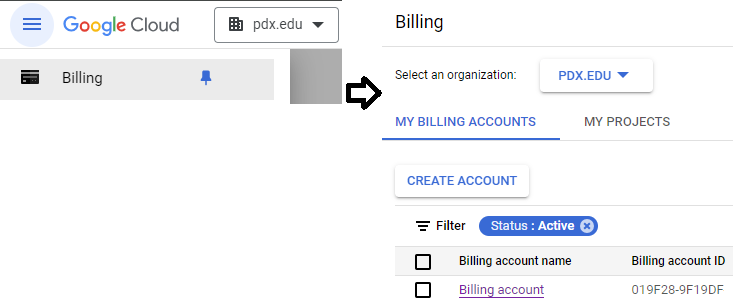
To examine your Billing account and its usage, go to the Billing page from the console at https://console.cloud.google.com/billing
Google Generative AI API
We'll be using Google's Gemini Pro as one of our models as it can be run via the course coupon and does not require students to use a credit card. The model can be easily leveraged by programs running outside of Google Cloud. To do so, we'll first need to enable its API. Navigate to the web console at https://console.cloud.google.com/, then launch Cloud Shell.

Run the following command to enable the API.
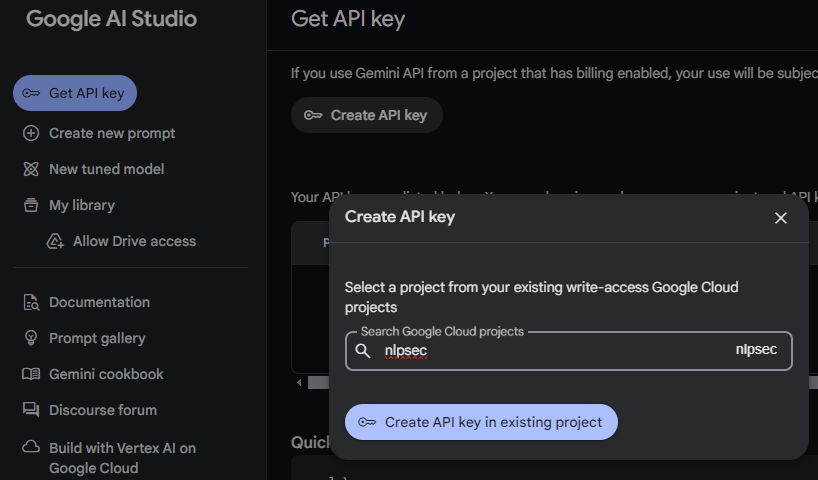
gcloud services enable generativelanguage.googleapis.comAPI keys that are in the pay-as-you-go tier need to be set up via Google's AI Studio at https://aistudio.google.com. From Google's AI Studio import your cloud project and create an API key using the project. We will utilize this key within AI Studio when building applications that require access to models.
ChatGPT

ChatGPT is OpenAI's Large Language Model service. Visit ChatGPT's site at https://chat.openai.com/. Sign in using your PSU e-mail address.
Claude

Claude is an AI assistant from Anthropic. It allows for free usage, but with limited features. Visit the site at: https://claude.ai/ . Create an account using your school e-mail address.
Gemini

Gemini is Google's multimodal Large Language Model service. Visit Google's Gemini site at https://gemini.google.com/.
NotebookLM

NotebookLM is Google's service that allows users to bring their own data for use with the LLM. Visit the site at https://notebooklm.google/ and access the service.
AI Studio

Google's AI Studio is a general purpose service for building applications using LLMs. Visit the site at https://aistudio.google.com.
Course exercises will require you to take screenshots to add to slide presentations. To begin with, for the computer you're using for the course, prompt a model for instructions on how to capture a part of your screen as an image.
- Add a slide to the presentation and paste the screenshot into it
Next, we'll use AI to find out more about it. Prompt a model to find out the top uses for Generative AI.
What are the top 10 uses for Generative AI
Then, compare the output to this list https://hbr.org/data-visuals/2025/04/top-10-gen-al-use-cases
- Add to a slide what the main differences are between the lists
Finally, prompt a model to find out the different types of models available (e.g. coding, video, image, etc.) and the best ones for each type.
What are the top generative AI models for each type of model (e.g. reasoning,
coding, image, video, audio)?
Then, compare the output to this list https://arena.ai/leaderboard and what has been given in the slides.
- Add a slide to the presentation that highlights the main differences between the lists
Like all forms of communication, communicating with a model using prompts takes practice to become effective at it. In this exercise, you will compare the results of identical prompts given to two different models of your choice over simple and advanced tasks.
Simple tasks
Summarization
Models can take large amounts of text and summarize it. Find the text for a multi-page document or speech. Examples might include:
- Declaration of Independence
- Martin Luther King Jr.'s "I Have a Dream" speech
- Amanda Gorman - The Hill We Climb
- Malala Yousafzi - Nobel Peace Prize Acceptance
- Maya Angelou - "On the Pulse of Morning"
- President Abraham Lincoln - Gettysburg Address
- President John F. Kennedy - "We choose to go to the Moon"
- William Shakespeare - The St. Crispin's Day speech from Henry V
Then, prompt the models to generate a short summary and compare the outputs
Summarize the text below in 100 words or less:
   <TEXT>
Story generation
Write a 200-word horror story where every sentence starts with the next
letter of the alphabet (A, B, C...). It must have a coherent plot with a
twist ending.
Completion
The sentence 'I saw her duck' has multiple meanings. List every possible
interpretation, provide a context sentence for each, and then write a short
comedy sketch where the ambiguity causes a misunderstanding
- Add a slide to the presentation that highlights the main differences between the outputs of the two models
Reasoning tasks (link)
Multi-step math reasoning
A snail climbs 3 feet up a well during the day but slips back 2 feet at
night. The well is 30 feet deep. On what day does the snail reach the top?
Logical reasoning
Five houses in a row are painted different colors. The green house is
immediately to the right of the ivory house. The person in the middle house
drinks milk. Given only these three clues, what are all the valid
arrangements?
Causal reasoning
A company notices that online sales and website crashes both increase
during major promotions. A new manager suggests canceling all promotions to
reduce crashes. Write a memo explaining why this is incorrect, describe the
actual relationship between the two trends and propose a real solution.
- Add a slide to the presentation that highlights the main differences between the outputs of the two models
Prompts can be a doorway to model functionality. It is important that one develops the ability to communicate with a model in a way that maximizes their utility while minimizing the time it takes for you to extract results from it. For this exercise, you will experiment with prompt strategies and examine how the output of an LLM changes as your prompt strategies change.
Begin by prompting an LLM for the 3 most important strategies to remember when developing prompts as well as example prompts showing ineffective versus effective prompts. Then, for each prompt strategy, deliver the prompts to an LLM of your choice and qualitatively compare the differences in output.
- Add a slide to the presentation that compares the main differences between the outputs of the two prompts
Next, you will try out different prompts that have been collected from a variety of sources (link) and augment it with any of the strategies you have learned. For each prompt, examine the output of the original prompt and the modified one.
Five essential questions
Analyze this link <LINK> and generate 5 essential questions that, when
answered, capture the main points and core meaning.
Reasoning
A store had 24 apples. They sold half of them in the morning and a third of
the remaining in the afternoon. How many apples are left?
Dialectical conversation
Create a dialectical conversation between two people: Amber & Rick.

The topic they are discussing is: <TOPIC>
- Add a slide to the presentation that shows the difference in output between the outputs of the two models
Model benchmarking
Models are trained with different capabilities. Selecting the right model for a particular task is a continuous process. For this part of the homework, you will experiment with a variety of tasks and examine how well different LLMs perform them. To do so:
- Prompt an LLM for 3 challenging prompts that can be used to compare how well LLMs perform a range of tasks.
- Then, for each task, deliver the same prompt to two different LLMs of your choice and qualitatively compare the differences in output.
Models and your career
Generative AI is changing the nature of work in many disciplines overnight. In this exercise, for the career you are currently interested in pursuing, use the prompt strategies learned in class to:
- Prompt an LLM for the top 10 uses in the discipline or career you intend to pursue
Next, as you map out your academic career and prepare for the future, you will need to understand how you might prepare best for it. Using the prompt strategies learned in class:
- Prompt a model to find out what skills and practices that might be recommended in preparation for a future where Generative AI may perhaps outperform humans across many tasks that are currently being done manually.
Screencast
Upon completing your experiments, via a narrated screencast of no longer than 5 minutes, you will perform a demonstration and walk-through of your results. Ensure that the video camera is turned on initially in your screencast. You may use screencast software of your choice. Options include video conferencing applications such as Google Meet and Zoom or dedicated programs such as OBS Screen Recorder, QuickTime (MacOS), Screencast-O-Matic (Windows), or RecordMyDesktop (Linux). In addition, CaptureSpace Lite is available via PSU's Media Space (https://media.pdx.edu).
Rubric
We will be using the following rubric to evaluate your homework.
Instructions followed properly including length of screencast and video camera initially turned on |
Demonstration of prompt strategies used in formulation of each prompt |
Walkthrough and analysis of the results of each prompt |
Submission
Upload your completed screencast on MediaSpace. Ensure that it is published as "Unlisted". To do so, visit MediaSpace and click on "My Media".
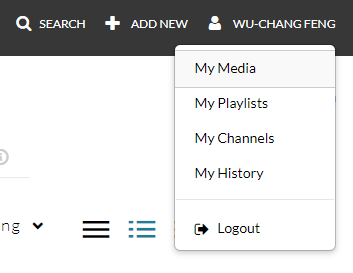
Click on the screencast video that has been uploaded. Then, in the tabs below, select the "Publish" tab, click on "Unlisted", and then "Save".
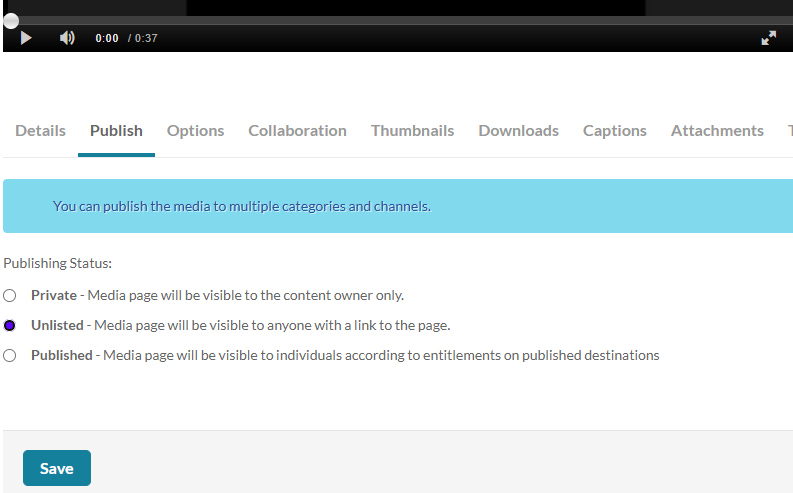
Then, in Canvas, submit the URL that your unlisted screencast on MediaSpace is located.